
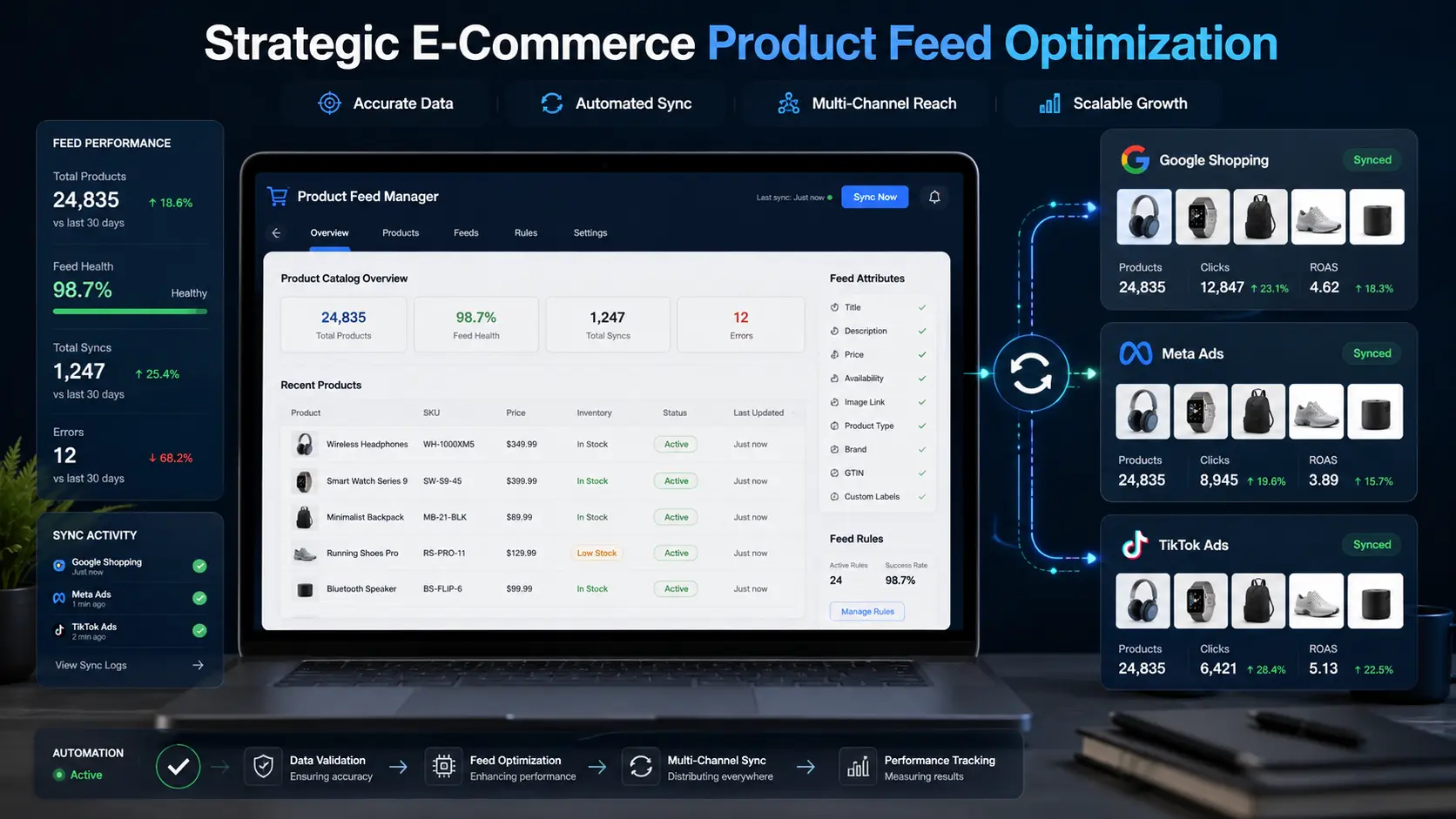
7 Powerful E-Commerce Product Feed Optimization Strategies

[toc]
E-Commerce Product Feed Optimization: 7 Proven Ways to Boost Sales Across Google, Meta & TikTok
E-commerce product feed optimization is the single most overlooked lever in shopping campaign performance. You have connected your product catalog to Google Shopping. You have synced everything to Meta. You have launched campaigns on TikTok. The ads are running, the budget is spending — and yet the results are nowhere near what you expected. Costs are higher than they should be. Some products barely get any impressions. Others get clicks but never convert.
The instinct is to blame the bidding strategy. Or the creative. Or the audience targeting. But in the majority of cases, when shopping campaigns underperform without an obvious reason, the real problem is upstream — it is in the data those campaigns are built on.
Your product feed is the foundation of every shopping campaign you run. It is the structured file that tells advertising platforms what your products are called, how much they cost, whether they are in stock, what category they belong to, and which shoppers they should be shown to. When that foundation is clean, accurate, and properly optimized, algorithms can do their job well. When it is not, you are essentially paying to show the wrong products to the wrong people — and wondering why nothing is working.
This guide walks through seven powerful e-commerce product feed optimization strategies for Google Shopping, Meta Ads, and TikTok Ads in 2026 — and explains exactly why each one matters to your bottom line.
Short Answer
E-commerce product feed optimization is the process of improving product data — including titles, descriptions, images, pricing, inventory status, and product attributes — to increase visibility, improve click-through rates, reduce advertising costs, and generate more conversions across Google Shopping, Meta Ads, and TikTok Ads.
1. Why E-Commerce Product Feed Optimization Actually Matters
Most e-commerce businesses pour significant resources into advertising budgets, campaign structures, and creative assets. The product feed — the actual data file powering all of it — rarely gets the same attention. That is a serious strategic gap that quietly drains budget every single day.
Advertising platforms do not see your products the way your customers do. They do not browse your store, look at your photography, or read your brand story. What they see is your feed. The quality of that feed determines how well the algorithm understands what you are selling, how accurately it categorizes your products, and how confidently it matches your listings to relevant shopper queries.
A well-optimized feed does not just improve one metric. Because every shopping campaign runs on product data, improvements at the feed level improve performance across every channel simultaneously. Better titles improve click-through rates. More complete attributes improve match accuracy and filter visibility. Real-time inventory sync eliminates wasted spend. Correct category mapping improves algorithm targeting. The gains compound in a way that almost no other marketing investment can match.
For growing e-commerce brands, e-commerce product feed optimization is one of the highest-leverage investments available — and one of the most consistently overlooked. For more on how feed quality affects campaign performance, see our guide on multi-vendor marketplace architecture: /multi-vendor-marketplace-architecture
2. Understanding Product Feed Architecture
Before getting into specific optimization strategies, it is worth understanding what a product feed actually is and how it connects your inventory to the advertising platforms.
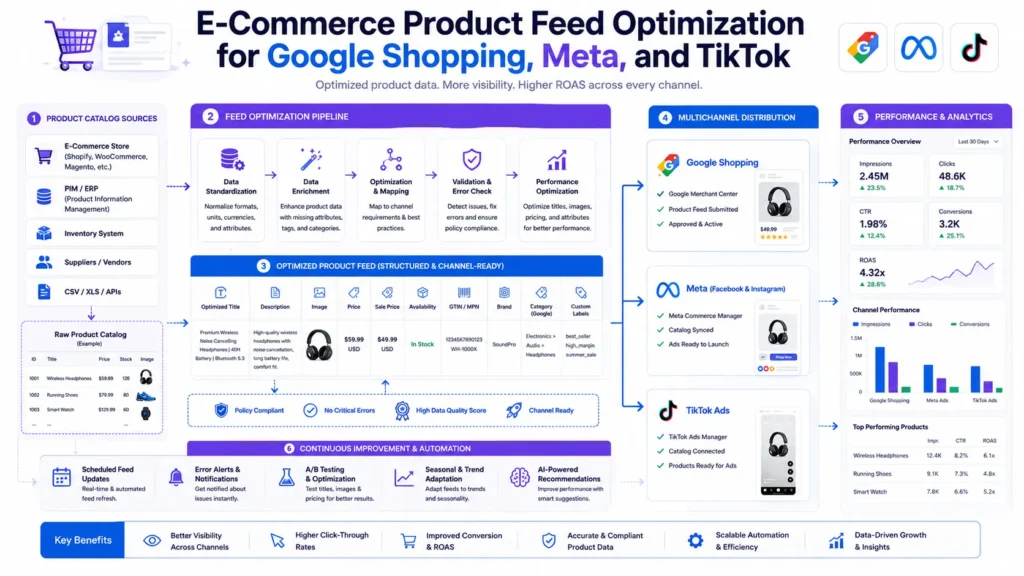
A product feed is a structured data file — most commonly XML, CSV, or TXT format — that contains a standardized set of attributes for every product in your catalog. Each advertising platform has its own schema with its own required and recommended fields. Google Merchant Center expects fields like id, title, description, link, image_link, price, availability, brand, and gtin. Meta Commerce Manager has its own attribute set. TikTok Business Center has its own requirements, some of which differ meaningfully from the other two.
Think of your product database as the source of truth and your feed as the translation layer that converts that data into the specific language each platform understands. When the translation is accurate and complete, the algorithm has everything it needs to work effectively. When the translation is poor — when titles use internal SKU codes, categories are mismatched, images fall below pixel requirements, or GTINs are missing — the algorithm has to fill in the gaps itself. Algorithms that have to guess produce less accurate results, which means your products reach less relevant audiences, your click-through rates drop, and your cost-per-acquisition climbs.
3. Proven Strategy 1 — Optimize Product Titles for E-Commerce Product Feed Optimization
Product titles are the single most important field in any product feed. They are the primary signal shopping algorithms use to match your listings to search queries, and they are the most prominent piece of text a shopper sees in the ad itself.
The mistake most brands make is using internal product names as feed titles. Internal names are created for operational convenience — they help warehouse staff and inventory systems identify products quickly. They are not designed for customer search behavior. “Model X-900 BLK LG” is perfectly clear to your operations team and completely invisible to a shopper searching for “black men’s large running jacket.”
The Right Title Formula
The solution is a formula-driven approach that mirrors how real customers search. A reliable general formula is:
Brand + Product Type + Primary Attribute + Secondary Attribute + Model Name
Applied to a running jacket, this produces: “Nike Men’s Lightweight Running Jacket — Black — Large — Windrunner.” Every element of that title corresponds to something a motivated buyer might actually type into a search bar.
The right formula varies by category. For electronics, model numbers are critical. For fashion, color, size, and gender drive the most search volume. For home goods, material and dimensions are often the deciding search terms. Researching the actual search behavior in your specific categories is what separates a functional title strategy from a genuinely high-performing one. Google’s own Keyword Planner is a reliable starting point for understanding how your customers actually search.
Front-Load the Most Important Attributes
One practical tip: front-load the most important attributes. Titles get truncated in many ad placements, especially on mobile. If “Nike” and “Running Jacket” appear first and “Black Large” appears later, you have prioritized correctly. If your title starts with a style code or a generic product ID, you have wasted the most visible real estate in your ad.
4. Proven Strategy 2 — Complete Product Attributes
Beyond required fields, both Google and Meta offer a range of optional and recommended attributes that most merchants skip entirely. This is a missed opportunity that directly affects visibility and targeting accuracy.
Advertising platforms reward completeness. The more attributes you populate — color, size, material, pattern, gender, age_group, size_system, item_group_id — the better the algorithm can match your products to specific searches, filtered browsing sessions, and audience targeting signals.
Why the item_group_id Attribute Matters
Consider what happens when a shopper uses Google Shopping’s filter panel to narrow results by color, gender, and size. Products with those attributes populated appear in the filtered results. Products without them disappear — regardless of how well their titles are written.
The item_group_id attribute deserves special attention. This field groups product variants — different sizes and colors of the same base product — under a single identifier. When variants are correctly grouped, Google can display the most relevant variant to each shopper based on their query. Without it, your variants compete against each other and the algorithm has no way to understand that they are related.
5. Proven Strategy 3 — Improve Product Images
Images are the first thing shoppers notice in a shopping ad — before the title, before the price, before anything else. On visually-driven platforms like Meta and TikTok, image quality can be the single determining factor in whether a shopper stops or scrolls past.
The baseline requirements are consistent across platforms: high resolution, no watermarks, no promotional text overlaid on the image, clear product visibility, and professional photography. Where platforms diverge is in what they reward algorithmically beyond those basics.
Platform-Specific Image Strategy
Google Shopping favors clean, well-lit product shots on white or neutral backgrounds. Meta performs better with lifestyle imagery that shows products in context — worn by real people, placed in real environments. TikTok rewards content that feels native to the platform, which often means video content alongside or instead of static photography.
For brands with large catalogs, building platform-specific image variants into your e-commerce product feed optimization workflow is an advanced technique that requires more setup but produces measurably better results.
Mobile Thumbnail Review
Mobile optimization is non-negotiable. The majority of shopping ad clicks happen on smartphones, where your product image renders as a small thumbnail. An image that looks sharp on a desktop monitor can become unreadable at thumbnail size if the product is photographed from too far away or against a visually complex background. Review every image at thumbnail size before it goes into production.
6. Proven Strategy 4 — Implement Real-Time Inventory Synchronization
Inventory mismatches are one of the most direct causes of wasted advertising spend, and they are entirely preventable.
When a product goes out of stock in your warehouse but remains active in your product feed, your campaigns continue serving ads for that product. Shoppers click, pay the click cost, arrive at a product page showing “Out of Stock,” and leave. The customer is frustrated. The budget is gone. Nothing was sold. Multiply that across dozens of out-of-stock products running for hours or days before your feed updates, and the waste becomes substantial.
Price Sync and Account Health
The same problem applies to pricing. If your website price changes and your feed does not sync immediately, Google Merchant Center flags the discrepancy. Individual products get suspended. In cases of repeated violations, entire accounts can be affected. Price sync is not just an optimization — it is account health maintenance. You can review Google Merchant Center’s policies on pricing accuracy in their official support documentation.
API-Based Real-Time Sync
API-based real-time synchronization connects your inventory management system directly to your merchant centers. When a product goes out of stock, your feed updates within minutes and your ads pause automatically. When stock is replenished, ads resume. This level of responsiveness is not achievable with scheduled daily exports — it requires a live API connection between your backend systems and the advertising platforms.
7. Proven Strategy 5 — Use Custom Labels
Custom labels are one of the most underutilized features in e-commerce product feed optimization, and they unlock a level of campaign sophistication that is otherwise impossible.
Custom labels are merchant-defined tags that you apply to products based on criteria that matter to your specific business. Unlike category or attribute fields which have standardized values, custom labels are completely flexible. Common use cases include grouping products by profit margin tier, identifying bestsellers versus slow movers, flagging seasonal products, marking clearance inventory, and tagging new arrivals.
Once products are labeled, you can reference those labels in your campaign structure to apply differentiated bidding strategies. Your highest-margin products get more aggressive bids. Your clearance inventory gets lower bids focused on volume efficiency. Your seasonal products get budget boosts during peak periods and pauses off-season.
8. Proven Strategy 6 — Create Platform-Specific Feeds
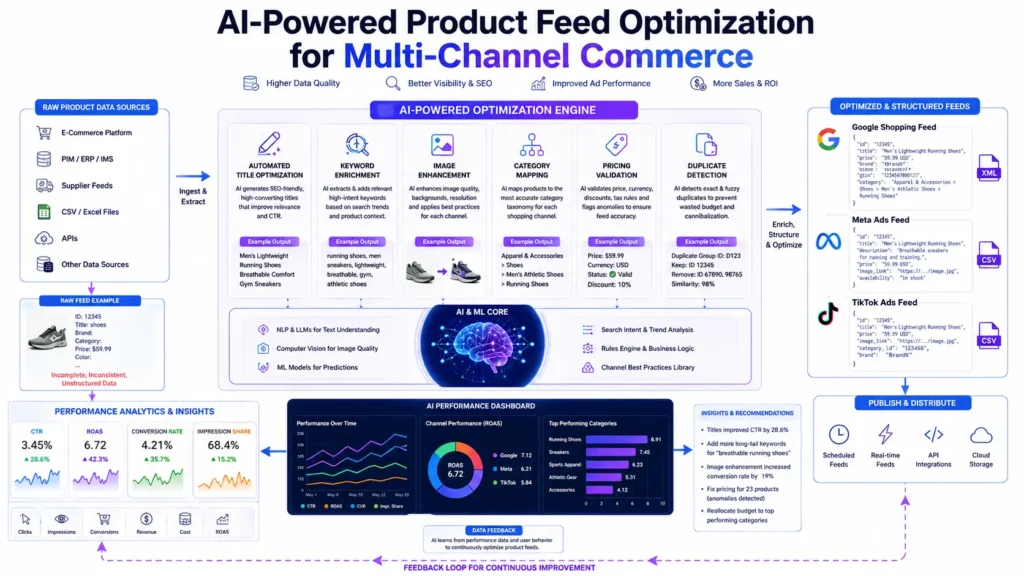
A single feed structure served identically to Google, Meta, and TikTok is a compromise that serves none of them particularly well. Each platform evaluates product data through a different lens, and feeds optimized for each platform’s specific priorities consistently outperform generic multi-channel feeds.
Google Shopping vs Meta vs TikTok
Google Shopping is fundamentally a search-intent platform. GTIN accuracy, title keyword alignment, detailed attribute completion, and precise category mapping are what drive performance here.
Meta operates more as a discovery and audience platform. Demographic attributes like gender and age_group are more important here than on Google. High-quality lifestyle imagery performs better than standard white-background product shots.
TikTok is the most visual and engagement-driven of the three. Video content increasingly outperforms static images in TikTok shopping placements. The platform’s algorithm rewards products that generate organic engagement — saves, shares, and profile visits.
9. Proven Strategy 7 — Monitor Feed Quality Regularly
Product feeds are not a set-and-forget system. Catalogs change, platform policies update, image URLs break, prices shift, and inventory fluctuates. A feed that was fully compliant and well-optimized at launch will drift out of compliance and lose optimization over time without active monitoring.
Regular feed audits should check for missing or incomplete attributes, broken image URLs, pricing mismatches between the feed and the live website, products that have been disapproved without triggering manual review, and category mapping that no longer reflects updated platform taxonomies.
Most merchant centers provide diagnostic dashboards that surface feed errors and disapprovals automatically. Building a routine review of those dashboards into your weekly operations is what separates brands that maintain consistently strong feed performance from those that periodically wonder why their campaigns have stopped working.
10. Google vs Meta vs TikTok Feed Requirements
Feature | Google Shopping | Meta Ads | TikTok Ads
———————–|——————–|——————-|——————
GTIN Importance | Very High | Medium | Medium
Search Intent | High | Moderate | Low
Audience Discovery | Moderate | High | High
Video Content | Limited | Moderate | Very High
Attribute Completeness | Very High | High | High
Visual Impact | High | Very High | Very High
11. Product Feed Optimization Checklist
Task | Priority | Benefit
—————————————-|———–|———————————-
Accurate GTIN / UPC data | Critical | Higher approval rates
Optimized product titles using formula | Critical | Higher click-through rate
Real-time inventory synchronization | Critical | Prevents wasted spend
Promotional text removed from titles | High | Prevents account suspension
Correct category mapping | High | Better algorithm targeting
Complete recommended attributes | High | Improved filter visibility
Custom label strategy implemented | High | Enables precision bidding
High-resolution image URLs | Medium | Improves ad quality score
Mobile thumbnail image review | Medium | Reduces scroll-past on mobile
Platform-specific feed optimization | Medium | Better per-channel performance
12. Common Mistakes That Quietly Drain Your Ad Budget
Using Internal SKU Names as Titles
Customers do not search for “ABC-123-BLK.” They search for “black leather ankle boots size 8.” Your titles need to reflect actual customer search language, not internal inventory codes. This single mistake can suppress impressions across your entire catalog without triggering any obvious error in your merchant center.
Incomplete Product Attributes
Missing color, size, gender, or material fields removes products from filtered search results and reduces algorithm matching accuracy — even when titles are well-optimized. Attributes are not optional extras; they are the data that makes your products findable in the exact moments shoppers are most ready to buy.
Poor or Non-Compliant Images
Blurry images, watermarked photos, excessive text overlays, and low-resolution files all reduce ad quality scores and can trigger disapprovals. This is especially painful because image disapprovals often happen silently — your product simply stops showing without any notification unless you are actively monitoring your merchant center diagnostics.
Outdated Inventory Information
Advertising out-of-stock products wastes budget and damages the customer experience in the same transaction. Pricing mismatches between your feed and website trigger Merchant Center suspensions that can take days to resolve.
Treating Feed Optimization as a One-Time Task
Feeds drift. Platform requirements change. Catalog data becomes stale. Brands that treat e-commerce product feed optimization as a launch activity rather than an ongoing discipline consistently see performance decline over time — often blaming campaigns, budgets, or seasonality for problems that are actually rooted in their feed data.
Frequently Asked Questions
Q: What is e-commerce product feed optimization?
A: E-commerce product feed optimization is the process of improving the structured product data file that connects your catalog to advertising platforms like Google Shopping, Meta Ads, and TikTok Ads. It covers product titles, descriptions, images, pricing, inventory status, attributes, and category mapping — all of which directly affect how well the advertising algorithm matches your products to relevant shoppers.
Q: How often should a product feed update?
A: Real-time API synchronization is the standard to aim for. If real-time sync is not yet in place, updating every few hours significantly reduces the window during which out-of-stock products receive paid traffic. Once-daily syncs are inadequate for any catalog with meaningful inventory movement.
Q: Why are my products disapproved in Google Merchant Center?
A: The most common causes are missing required attributes like GTINs, price mismatches between the feed and the live website, and policy violations such as promotional text in product titles. A systematic audit of the Merchant Center diagnostics tab typically identifies patterns that can be fixed at the template level.
Q: Does feed optimization improve organic SEO?
A: Indirectly, yes. Rich, structured product data helps search engines understand your catalog more completely, which strengthens topical authority and improves product page indexing. The discipline of maintaining accurate, detailed product data also tends to improve on-site product page quality — which has direct SEO value beyond advertising.
Q: What are custom labels used for in product feed management?
A: Custom labels are merchant-defined tags that group products based on business-specific criteria — margin tier, bestseller status, seasonality, and clearance inventory are common examples. They enable differentiated bidding strategies that a standard campaign structure without labels simply cannot support.
Q: Why are GTINs so important for Google Shopping?
A: GTINs allow Google to match your product listing against manufacturer product pages and competitor listings for the same item. Products with valid GTINs receive more accurate categorization, better auction positioning, and improved impression share compared to equivalent products without them.
Q: Do small online stores need product feed optimization?
A: Yes. Even small catalogs benefit from improved match accuracy, better filter visibility, and reduced disapproval rates. The competitive advantage of a well-optimized feed is not reserved for large brands — it is available to any merchant willing to invest the time in getting their product data right.
The Bottom Line
Your product feed is the infrastructure that every shopping campaign you run is built on. Improvements at the feed level ripple across every channel simultaneously — better titles improve click-through rates everywhere, real-time inventory sync reduces wasted spend everywhere, and complete attributes improve algorithm targeting everywhere.
E-commerce product feed optimization is not the most visible type of marketing work. It does not have the creative appeal of ad design or the strategic excitement of audience targeting. But it is consistently among the highest-leverage improvements available to a growing e-commerce brand — because the gains compound. A cleaner feed produces better match rates. Better match rates produce better Quality Scores. Better Quality Scores produce lower CPCs. Lower CPCs produce more volume from the same budget.
If your shopping campaigns are underperforming and you have not audited your feed recently, that is exactly where to start.
Ready to Turn Your Product Feed Into a Growth Engine?
We audit product feeds, identify exactly what is suppressing performance, and implement the fixes that move the needle — across Google Shopping, Meta Ads, and TikTok Ads.
More Blog

Nginx Redis Caching Optimization: 6 Proven Speed Tactics
Driving a flood of new visitors to your website is supposed to be the win. It only feels…


IPFS and Arweave: Powerful Decentralized Storage Guide
Decentralized storage for web apps is moving from a niche Web3 concept into a practical infrastructure decision that…

Make.com vs n8n: 5 Powerful Facts for Business Workflows
Make.com vs n8n is one of the most genuinely useful comparisons you can make before committing to an…