

High-Availability Cloud Infrastructure: 5 Proven Steps

[toc]
High-Availability Cloud Infrastructure: AWS, DigitalOcean, Backups, and Scaling
High-availability cloud infrastructure is the architectural standard that separates businesses that survive traffic spikes, hardware failures, and data center outages from the ones that go offline when it matters most. For enterprise platforms, SaaS applications, and high-volume eCommerce brands, building a high-availability cloud infrastructure is no longer optional — it is a fundamental business requirement.
A single point of failure in your hosting setup can bring down your entire platform in seconds. One overloaded server, one failed database node, one data center power outage — and customers cannot check out, users cannot log in, and revenue stops immediately. The longer the outage lasts, the more lasting the damage to customer trust becomes. High-availability cloud infrastructure eliminates that risk by distributing your application across independently managed, redundant layers that keep running even when individual components fail.
This guide covers exactly what high-availability cloud infrastructure is, why it matters for every business with a revenue-generating digital platform, how the architecture actually works at a technical level, and the five proven steps your engineering team needs to implement it correctly across AWS, DigitalOcean, or any modern cloud environment.
What Is High-Availability Cloud Infrastructure?
High-availability cloud infrastructure is a decentralized server architecture engineered to keep systems running continuously, even when individual components go offline. Instead of a single server handling everything — web traffic, application logic, database queries, file storage, and logs — high-availability cloud infrastructure distributes each of those responsibilities across independent, redundant layers managed by automated failover systems.
When any component in a high-availability cloud infrastructure fails, the system detects the failure automatically and reroutes traffic or promotes a backup component without any manual intervention. The end user experiences nothing. No error page, no timeout, no broken session. The architecture absorbs the failure and continues operating.
A properly built high-availability cloud infrastructure operates across three core layers that work together continuously. The first is a pool of stateless application servers that can be added, removed, or replaced at any time without affecting the user experience. The second is a replicated database cluster that automatically promotes a synchronized backup node to primary status if the main database node fails. The third is an off-site backup system with point-in-time recovery capabilities that protects data against human error, corruption, and catastrophic events that automated failover alone cannot prevent.
Why High-Availability Cloud Infrastructure Matters for Your Business
Protecting Revenue During Unexpected Traffic Surges
For any business where the website generates revenue — eCommerce stores, SaaS platforms, booking systems, marketplaces — downtime is a direct financial loss, not just a technical inconvenience. High-availability cloud infrastructure keeps checkout flows, user sessions, payment processing, and application logic running continuously even when traffic spikes suddenly and without warning, such as during a flash sale, a viral marketing moment, or an unexpected mention in a major publication.
Without high-availability cloud infrastructure, a sudden traffic surge that pushes a single server past its capacity limits is enough to take the entire platform offline. With it, auto-scaling adds capacity automatically and load balancers distribute the incoming requests across the expanded pool of servers before any single node is overwhelmed.
Scaling Without Engineering Emergencies
Traditional single-server or basic VPS hosting forces teams into one of two bad positions: overprovision resources and pay for capacity they do not use most of the time, or underprovision and scramble to upgrade in the middle of a traffic event. High-availability cloud infrastructure eliminates both problems by scaling horizontally and automatically in response to real-time demand signals, then scaling back down when demand normalizes.
Protecting Technical SEO and AI Search Visibility
Search engines actively penalize websites that return frequent 500-level server errors, connection timeouts, or slow response times. Consistent uptime and fast server performance protect the technical SEO investments your business has built over time. High-availability cloud infrastructure also keeps your pages accessible to AI crawlers that retrieve content for tools like Google AI Overviews and Perplexity — systems that operate under tight timeout windows and will simply skip pages that do not respond quickly enough.
Eliminating Single Points of Physical Infrastructure Failure
Hardware failures, power outages, and network disruptions at data centers are not rare hypothetical scenarios. They happen regularly across every major cloud provider. High-availability cloud infrastructure mitigates this risk by distributing your application across multiple geographic Availability Zones — separate physical data centers that operate independently. A failure in one zone does not affect the others.
Building a Foundation That Scales With the Business
Businesses that architect for high availability from the beginning avoid the expensive, disruptive technical rebuilds that come from trying to retrofit scalability and redundancy onto a platform that was never designed for it. High-availability cloud infrastructure is an upfront investment that pays compounding returns as the business grows.
How High-Availability Cloud Infrastructure Actually Works
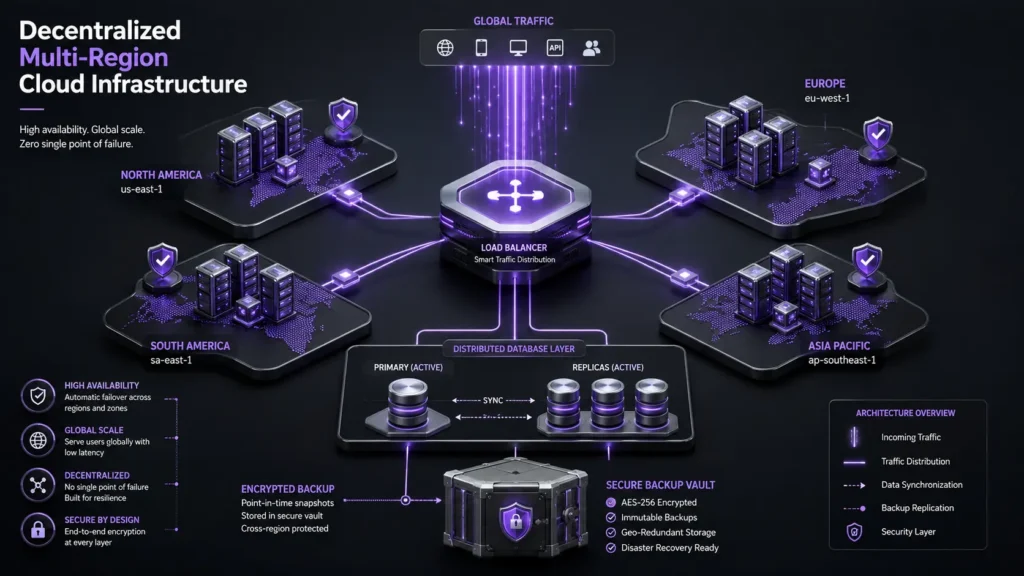
Most businesses begin their digital infrastructure journey with a monolithic setup — a single server that runs the web server software, application logic, relational database, file storage system, and logging scripts all together in one place. This architecture is simple and inexpensive at small scale, but it creates a catastrophic single point of failure. When that one server fails for any reason, every part of the application fails with it simultaneously.
High-availability cloud infrastructure removes this dependency by isolating each layer of the application stack into its own independently managed component. A managed load balancer sits at the network perimeter, receiving all incoming traffic and distributing requests across a cluster of application servers based on real-time health and load data. Those application servers are stateless — they hold no persistent data locally and can be replaced, added, or removed at any time without disrupting the user experience.
Behind the application layer, a dedicated database cluster manages all data operations using a primary-replica replication model. Every write to the primary database node is continuously replicated to one or more replica nodes running in separate physical Availability Zones. If the primary node fails for any reason, the cluster detects the failure and promotes a replica to primary status automatically. Object storage systems — like AWS S3 or DigitalOcean Spaces — handle all file storage separately from the application servers, ensuring that user uploads and generated assets are always accessible regardless of which application node handles a given request.
This architectural separation is what creates a genuinely self-healing high-availability cloud infrastructure environment. Individual components fail and are automatically replaced or bypassed without any user-visible disruption.
5 Proven Steps to Build High-Availability Cloud Infrastructure
Step 1 — Make Your Application Nodes Stateless
The foundational prerequisite for any high-availability cloud infrastructure is completely stateless application servers. If an application server stores session data, uploaded files, generated reports, or any other persistent information on its local disk, routing a returning user to a different server will immediately break their experience — missing files, logged-out sessions, corrupted state.
Building stateless application nodes for your high-availability cloud infrastructure requires two specific changes. First, move all file storage to a centralized object repository — AWS S3 or DigitalOcean Spaces — and serve those files through a global Content Delivery Network so that latency remains low for users in any region. Second, route all active session data into a shared in-memory cache like a Redis cluster, so any application server in the pool can authenticate and serve any user without needing access to locally stored session information.
Once every application server in your high-availability cloud infrastructure reads from and writes to the same shared storage and session layers, any node in the cluster can handle any incoming request. Failed nodes can be terminated and replaced with fresh instances without any user-visible impact.
Step 2 — Deploy a Managed Load Balancer With Continuous Health Checks
A managed load balancer is the entry point and traffic controller of your high-availability cloud infrastructure. It receives all incoming web traffic and distributes requests across the pool of healthy application servers using configurable routing algorithms — typically round-robin or least-connections for standard web applications.
More importantly for high-availability cloud infrastructure, the load balancer continuously runs health checks against every server in the cluster. If any node stops responding within the configured timeout threshold — due to a crashed application process, memory exhaustion, an out-of-memory kill, or a failed code deployment — the load balancer automatically removes that node from the active routing pool within seconds. Traffic continues flowing to the remaining healthy nodes without interruption.
This health-check mechanism also enables zero-downtime code deployments for your high-availability cloud infrastructure. Instead of taking the entire application offline for a release, your team can remove nodes from the pool one at a time, deploy the updated code, verify the node is healthy, and return it to the pool before moving to the next. Users experience no downtime or errors during the deployment process.
[H3] Step 3 — Implement Horizontal Auto-Scaling
Vertical scaling — responding to increased traffic by upgrading to a larger, more expensive single server — has hard physical and financial limits, and it still leaves a single point of failure in place. True high-availability cloud infrastructure scales horizontally by automatically adding identical server instances to the cluster when demand increases and removing them when demand drops.
Auto-scaling groups in your high-availability cloud infrastructure allow your team to define precise, metric-based conditions that trigger automated provisioning. A widely used starting configuration monitors cluster-wide CPU utilization: if the average CPU usage across all active nodes exceeds 75 percent for three consecutive minutes, the auto-scaling system provisions two additional identical instances and registers them with the load balancer. When CPU utilization drops back below the baseline threshold and remains there for a defined period, the system terminates the extra instances automatically.
This approach keeps your high-availability cloud infrastructure right-sized for actual traffic conditions at all times, without requiring engineering team involvement in routine scaling events.
[H3] Step 4 — Configure Database Replication and Automated Failover
Application servers in a high-availability cloud infrastructure are entirely disposable — they hold no unique data and can be replaced in minutes. Your database is the opposite. Every row, every transaction, every user record represents irreplaceable business data. Losing it is not recoverable the way a crashed web server is.
High-availability cloud infrastructure protects the database layer through continuous primary-replica replication. Every write operation that hits the primary database node is replicated in near-real-time to one or more replica nodes running in separate physical Availability Zones. If the primary node experiences a hardware failure, a network partition, or any other event that takes it offline, the database cluster’s automated failover logic detects the failure and promotes the most up-to-date replica to primary status — typically within under 60 seconds.
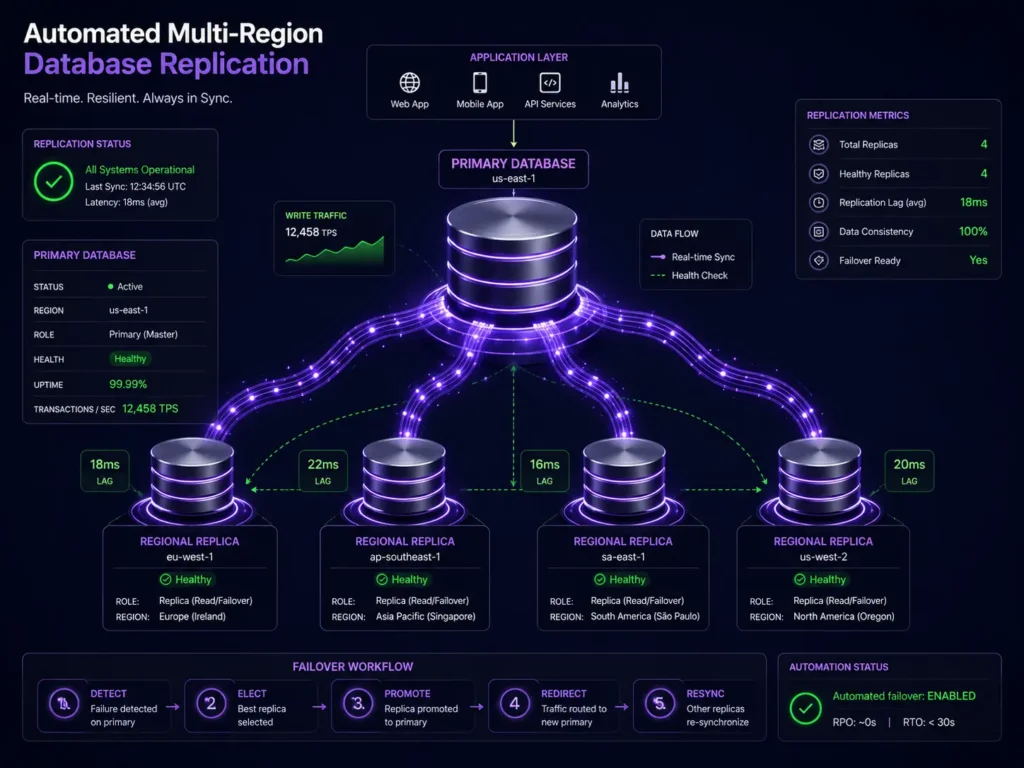
Read traffic in a high-availability cloud infrastructure can also be distributed across replica nodes, reducing the query load on the primary and improving overall database performance during peak usage periods. This read-replica pattern is especially valuable for analytics queries, reporting workloads, and any read-heavy access pattern that does not require up-to-the-second data freshness.
Step 5 — Activate Point-In-Time Recovery and Test Restores Quarterly
Automated failover in a high-availability cloud infrastructure protects against hardware failures and infrastructure events. It does not protect against human error — accidental deletion of records, a corrupted data migration, a bad deployment that writes incorrect data at scale, or a ransomware attack that encrypts your primary database. These scenarios require a backup strategy with genuine recovery capabilities.
Point-in-time recovery is the backup approach best suited for high-availability cloud infrastructure. Rather than capturing periodic snapshots that may be hours old at the time of a recovery event, PITR logs every individual database transaction continuously. This means that instead of restoring a snapshot from 12 or 24 hours before a problem occurred and accepting the loss of all data written since that snapshot, your team can roll back the database to any specific minute in the past — including the exact minute before a destructive operation was executed.
Daily encrypted snapshots stored in isolated, geographically separate backup buckets provide an additional layer of protection for your high-availability cloud infrastructure beyond what PITR covers.
The step that most teams skip, and the one that matters most: actually testing restores. Run a complete restoration test in a non-production environment every quarter. Automated backup jobs fail silently far more often than most engineering teams realize. A backup that has never been tested is not a recovery capability — it is an untested assumption.
AWS vs. DigitalOcean for High-Availability Cloud Infrastructure
Both AWS and DigitalOcean provide the core building blocks required for a production-grade high-availability cloud infrastructure, but they are designed for different teams, use cases, and operational maturity levels.
AWS is the enterprise standard for high-availability cloud infrastructure. It offers EC2 for compute instances, RDS for fully managed relational databases with automated Multi-AZ failover, Route 53 for global DNS with integrated health-check-based failover routing, Elastic Load Balancing for managed load distribution, and S3 for durable object storage. The AWS service catalog is extensive enough to support virtually any high-availability cloud infrastructure architecture. The trade-off is real: AWS requires dedicated DevOps expertise to configure and secure properly, billing is variable and can be difficult to forecast without disciplined cost monitoring, and the platform’s learning curve is steep for teams that are not already familiar with cloud infrastructure. For DNS failover setup specifically, the AWS Route 53 documentation covers health-check routing configuration in detail: https://aws.amazon.com/route53/
DigitalOcean is a strong choice for high-availability cloud infrastructure for mid-sized businesses, SaaS startups, and eCommerce platforms that need enterprise-grade reliability without enterprise-grade operational complexity. Managed Load Balancers, highly available Cloud Databases with automated primary-replica failover, scalable Droplets for compute, and Spaces for object storage cover all the core components of a production high-availability cloud infrastructure. Pricing is transparent, predictable, and significantly easier to budget against than AWS. The trade-off is that DigitalOcean does not provide the hyper-specific enterprise compliance certifications, bare-metal hardware options, or the breadth of specialized microservices that AWS offers natively.
For most growing businesses, DigitalOcean provides a faster path to a working high-availability cloud infrastructure. For large enterprise platforms operating under strict regulatory requirements or at massive scale, AWS is the more appropriate choice.
High-Availability Cloud Infrastructure Readiness Checklist
Before taking any high-availability cloud infrastructure setup live, work through this checklist to identify the gaps that most teams discover only after a production incident:
– Failover DNS routing: Is the domain on a DNS provider that supports automated health-check-based failover routing, such as AWS Route 53 or Cloudflare Enterprise?
– Managed load balancer deployed: Is SSL/TLS termination handled at the load balancer perimeter, with traffic distributed evenly across all healthy application nodes?
– Multi-AZ deployment confirmed: Are application servers running across at least two separate, independent physical Availability Zones?
– Stateless nodes verified: Has every code path been audited to confirm no session data, uploaded files, or configuration is written to local server disk?
– Shared session storage active: Is all user session data stored in a shared Redis or Memcached cluster accessible by every application node in the pool?
– Managed database with failover enabled: Is the database running on a managed cluster with automated primary-replica failover and monitoring?
– Point-in-time recovery active: Are continuous transaction logs being captured and stored in an isolated, off-site backup location separate from the primary database?
– Restore test completed: Has the team run and verified a full restore from backup in a non-production environment within the last 90 days?
– No hardcoded IP addresses: Are all internal service connections using DNS labels or environment variables, not static IP addresses that change as instances cycle?
Common Mistakes That Undermine High-Availability Cloud Infrastructure
Placing backup nodes in the same data center: The most common and most dangerous mistake in high-availability cloud infrastructure is running primary and backup servers in the same physical facility. A single power outage, cooling failure, or network disruption affects every server in that facility simultaneously. Availability Zones must be in separate physical locations with independent power and network connections.
Allowing local file writes on application servers: Any application component that writes uploaded files, generated documents, or cached assets to the local server disk creates a hidden dependency that breaks the stateless architecture high-availability cloud infrastructure requires. When a load balancer routes a returning user to a different node, those locally stored files are inaccessible. All persistent file writes must go to shared object storage.
Scaling compute without scaling the database: Auto-scaling application servers in a high-availability cloud infrastructure provides no benefit if the database becomes the bottleneck under increased load. Database connection limits, query throughput, storage I/O capacity, and read-replica configuration all need to be evaluated and scaled in parallel with compute tier scaling.
Assuming backup jobs are running correctly: Automated backup processes fail silently with surprising frequency. Log rotation errors, storage quota limits, permission changes, and configuration drift can all silently stop backup jobs without triggering any alert. Test restores quarterly without exception.
Hardcoding server IP addresses in application configuration: In a horizontal scaling high-availability cloud infrastructure, server IP addresses change constantly as instances are provisioned and terminated by auto-scaling processes. Any hardcoded IP reference in application code, configuration files, or internal service connections will break whenever the referenced instance is replaced. Use internal DNS labels or environment variables for all service discovery.
Frequently Asked Questions About High-Availability Cloud Infrastructure
What is the difference between backups and high availability?
Backups are static historical archives that allow data recovery after a failure — but the recovery process takes time, and the application is offline during that window. High-availability cloud infrastructure is a live architectural design that prevents the application from going offline in the first place by automatically detecting failures and rerouting traffic or promoting backup components before users experience any disruption.
Is AWS always better than DigitalOcean for enterprise high-availability cloud infrastructure?
Not necessarily. AWS offers more granular control and a larger service catalog, which is essential for large enterprise platforms with complex regulatory requirements. DigitalOcean is often the more practical choice for mid-sized businesses and fast-moving startups that need production-grade high-availability cloud infrastructure with significantly less configuration overhead and more predictable monthly costs.
Does a low-traffic marketing site need high-availability cloud infrastructure?
A simple marketing site with predictable, low traffic can run reliably on a single well-configured server. However, introducing a managed load balancer and basic redundancy early makes future scaling significantly easier — additional capacity can be added during unexpected traffic events without making structural changes to the domain or DNS configuration.
How does high-availability cloud infrastructure support AI search visibility?
AI retrieval systems like Perplexity and Google AI Overviews operate under strict timeout constraints when crawling and indexing web content. Fast, consistently available servers ensure that AI crawlers can successfully retrieve and parse your pages within those time limits, which directly supports your visibility in AI-generated search answers and citations. This connects directly to broader content optimization for AI search strategies.
Can an existing monolithic application migrate to high-availability cloud infrastructure?
Yes, though it requires systematic refactoring rather than a simple server migration. The core work involves rewriting all file storage operations to route assets to shared object storage like AWS S3 or DigitalOcean Spaces, and moving session management into a shared Redis layer. Once those local dependencies are removed, the application servers become stateless and the rest of the high-availability cloud infrastructure setup — load balancing, auto-scaling, database replication — can be layered on top.
What does point-in-time recovery do in a high-availability cloud infrastructure?
PITR logs every individual database transaction as it occurs, creating a continuous record of every change made to the database. Instead of restoring a full snapshot taken hours before a problem occurred and accepting the data loss for everything written since that snapshot, PITR allows the database to be rolled back to the precise minute — or even second — before a destructive operation was executed.
Final Thoughts
High-availability cloud infrastructure is not a capability reserved for large enterprise platforms with dedicated infrastructure engineering teams. Any business that depends on its website or application for revenue — an eCommerce store, a SaaS product, a client-facing platform, a booking system — has a legitimate need for the reliability and resilience that high-availability cloud infrastructure provides.
The architecture is well established: stateless application nodes behind a managed load balancer, horizontal auto-scaling driven by real-time demand signals, a replicated database cluster with automated failover, and off-site backups with regularly tested restore procedures. The platforms — AWS, DigitalOcean, and others — are mature, well-documented, and supported by extensive engineering communities.
What separates the businesses that build high-availability cloud infrastructure properly from the ones that keep putting it off is treating infrastructure reliability as a core business priority rather than a technical afterthought. Build the foundation correctly now and scaling becomes a routine operational process instead of a recurring crisis that disrupts customers and costs revenue.
More Blog
Next.js SSG vs SSR: 3 Proven Strategies for Better SEO
Next.js SSG vs SSR is the most important decision when building a project with Next.js. As digital landscapes…


Content Optimization for AI Search: 5 Proven Steps to Rank
The era of scrolling through ten blue links is quietly coming to an end. B2B buyers, technical decision-makers,…
7 Powerful E-Commerce Product Feed Optimization Strategies
E-commerce product feed optimization is the single most overlooked lever in shopping campaign performance. You have connected your…