
Headless Web Architecture: 7 Proven API Integration Tips
Most businesses do not realize their website architecture is holding them back until the symptoms become impossible to ignore. Pages that load slowly on mobile. A marketing team that cannot push content updates without developer involvement. An e-commerce platform that works fine on desktop but feels clunky on the app. A CMS that serves the website well but cannot push the same content to a native mobile application or a digital kiosk without a separate, redundant workflow.
[toc]
Headless Web Architecture: 7 Proven API Integration Tips
Most businesses do not realize their website architecture is holding them back until the symptoms become impossible to ignore.
Pages that load slowly on mobile. A marketing team that cannot push content updates without developer involvement. An e-commerce platform that works fine on desktop but feels clunky on the app. A CMS that serves the website well but cannot push the same content to a native mobile application or a digital kiosk without a separate, redundant workflow.
These are not isolated technical problems. They are symptoms of the same root cause: a monolithic architecture where the frontend and backend are tightly coupled, designed for a world where every user visited a website through a desktop browser.
That world no longer exists. Users interact with brands across websites, mobile apps, smart speakers, digital displays, and AI assistants — often across multiple surfaces in a single day. The architecture that serves one of these channels well almost never serves all of them without significant compromise.
Headless web architecture solves this at the foundation. By separating the frontend presentation layer from the backend content and data layer, and connecting them through APIs, headless architecture lets you manage content once and deliver it everywhere — without the performance compromises, development friction, and scaling limitations of a traditional monolithic CMS.
This guide breaks down how headless web architecture works, when it makes sense to adopt it, and what the transition actually involves.

1. The Problem With Monolithic Architecture at Scale
To understand why headless web architecture exists and why organizations invest in it, you need to understand what monolithic architecture gets wrong as complexity increases.
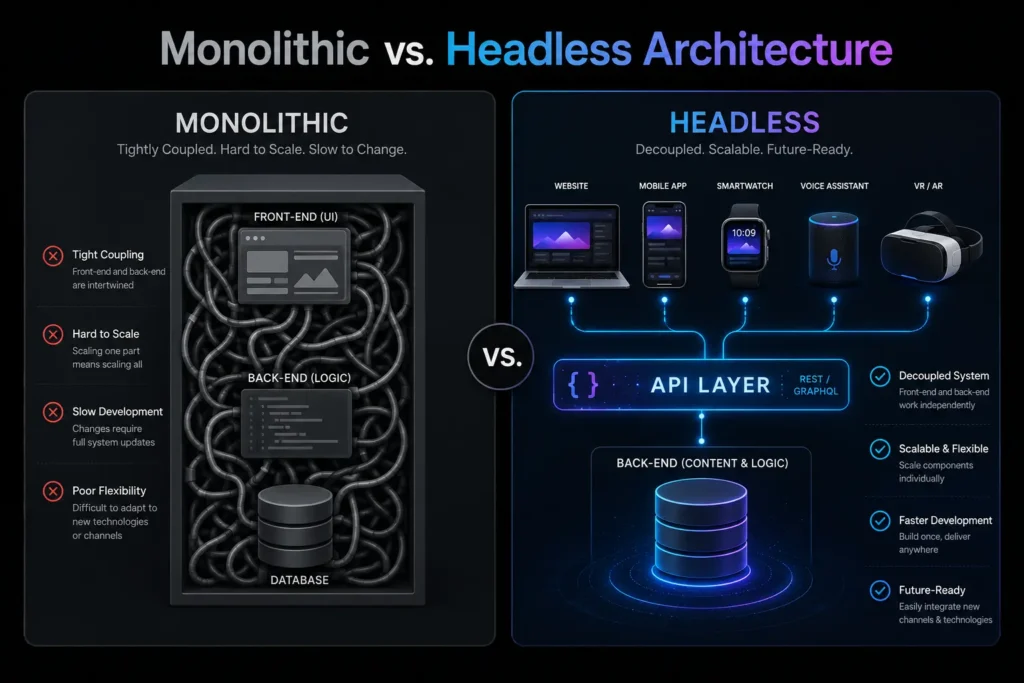
In a traditional monolithic CMS — WordPress, Drupal, Magento, or most hosted platforms — the frontend and backend are tightly coupled. The database stores the content. The CMS assembles the HTML based on templates. The server delivers the assembled page to the browser. All of this happens together, on the same system, every time a user loads a page.
This architecture is fine for a straightforward website with moderate traffic and a single delivery channel. The problems emerge at scale.
Development becomes a coordination problem
When frontend and backend are coupled, a change to the user interface can require touching backend code. A template update can break a plugin. A plugin update can break a template. Developers working on different parts of the system need to coordinate carefully to avoid conflicts. As the team grows and the system gets more complex, development slows down — not because the team is less capable, but because the architecture makes parallel work difficult.
Performance degrades as features accumulate
Monolithic CMS platforms typically serve pages by assembling them on the server on each request — querying the database, running template logic, and returning HTML. Under low traffic, this is fast enough. Under high traffic, or with a large number of plugins adding their own database queries and JavaScript to every page load, response times climb. Adding more server capacity helps, but it does not fix the underlying inefficiency of assembling every page from scratch on every request.
Scaling to new channels requires redundant work
When a business with a monolithic CMS wants to add a mobile app, a digital kiosk, or any other content surface, the backend cannot serve those channels directly. Content that lives in the CMS can only be delivered through the CMS’s rendering system. A mobile app needs a separate backend, or complex workarounds, to access the same content. The result is duplicated content management workflows and inconsistent content across channels.
Headless web architecture addresses all three of these problems structurally.
2. How Headless Web Architecture Actually Works
Headless web architecture separates the frontend — what users see — from the backend — where content and data live. The backend becomes a pure content repository with no opinion about how content is displayed. The frontend is built independently using modern JavaScript frameworks. An API connects the two.
The backend layer
In a headless architecture, the CMS stores content — articles, product data, images, structured records — but does not generate HTML. It exposes content through an API, typically REST or GraphQL. Common headless CMS platforms include Contentful, Sanity, Strapi, and headless WordPress configurations. The backend’s only job is to store content and make it available through the API.
The API layer
The API is the bridge between backend and frontend. When a user’s browser or app needs content, it sends a request to the API. The API queries the backend, retrieves the relevant data, and returns it — typically as JSON. This is the communication layer that makes headless web architecture work across multiple channels simultaneously.
The frontend layer
The frontend is built with a modern JavaScript framework — Next.js, React, Vue.js, or Nuxt.js — completely independently of the backend. It requests the content it needs from the API and renders it according to its own design and logic. Because it is decoupled from the backend, it can be rebuilt, redesigned, or replaced without touching the content or data layer.
The practical implication: the same backend can serve a website, a mobile application, a digital kiosk, and a voice interface — each with its own frontend, all pulling from the same content repository through the same API.
According to Netlify’s State of Web Development report, adoption of headless and Jamstack architectures has grown significantly among enterprise development teams — driven primarily by performance requirements and the need to serve content across multiple channels.
3. REST vs. GraphQL: Choosing the Right API Protocol
The API layer in a headless web architecture can be implemented using different protocols, and the choice between them affects both development experience and performance.
REST (Representational State Transfer)
REST is the established standard for web APIs. It organizes data around endpoints — specific URLs that return specific data. A REST API might have an endpoint for articles, an endpoint for products, and an endpoint for user accounts. Requests to these endpoints return the full data object associated with that resource.
REST is well-documented, widely supported, and compatible with virtually every development tool and language. For straightforward integrations and backends that need broad compatibility, REST is reliable and easy to work with.
The limitation: REST endpoints return fixed data structures. If a frontend component only needs three fields from a resource with twenty fields, it still receives all twenty. This over-fetching becomes a performance concern when mobile applications need to minimize data transfer to maintain speed on slower connections.
GraphQL
GraphQL, developed by Meta, solves the over-fetching problem. Instead of fixed endpoints that return fixed data, GraphQL exposes a single endpoint that accepts queries specifying exactly what data is needed. The frontend asks for precisely the fields it requires, and the API returns precisely those fields — nothing more.
For mobile applications and performance-sensitive frontends, GraphQL’s efficiency is meaningful. Smaller payloads mean faster responses and lower data usage. For complex UIs that need to pull related data from multiple resources in a single request, GraphQL’s ability to nest queries is also a significant advantage.
We recommend REST for straightforward integrations with broad compatibility requirements, and GraphQL for performance-critical applications where payload size and query flexibility matter. Many headless web architecture implementations use both — REST for simpler integrations and GraphQL for the primary content delivery layer.
4. Composable Architecture and Microservices
One of the most significant business benefits of headless web architecture is what it enables beyond the website itself: composable architecture.
A monolithic platform typically handles many functions — content management, e-commerce, user authentication, search, email — within a single system. The advantage is simplicity. The disadvantage is that the best-in-class solution for each of these functions is rarely the same system. When you are locked into a monolith, you use whatever capabilities the platform provides, even when better alternatives exist.
Headless web architecture enables a composable approach. Because each system communicates through APIs, you can select the best tool for each function and connect them through API integrations. The best search platform for your use case. The best payment processor for your market. The best CRM for your sales process. Each one connects to the others through APIs — and when a better alternative emerges, you swap the connection without rebuilding anything else.
This is what makes headless web architecture genuinely future-proof. The frontend can be redesigned without touching the backend. The backend can be migrated without rebuilding the frontend. Individual services can be upgraded or replaced without disrupting the rest of the system. Technical debt does not accumulate in the same way it does in a monolith, because each layer can evolve independently.
5. Performance, Core Web Vitals, and SEO Benefits
Performance is one of the most frequently cited reasons organizations move to headless web architecture, and the performance gains are structural rather than incremental.
Static generation and edge delivery
Modern JavaScript frameworks like Next.js support Static Site Generation (SSG) — the ability to pre-render pages at build time rather than assembling them on each request. Pre-rendered pages are served directly from a CDN edge node close to the user, without any server-side processing. Response times drop dramatically, and the system scales to handle traffic spikes without degrading.
For content that changes frequently, Incremental Static Regeneration (ISR) allows specific pages to be regenerated on a schedule or on demand, without rebuilding the entire site. This combines the performance of static delivery with the currency of dynamic content.
Core Web Vitals impact
Google’s Core Web Vitals — Largest Contentful Paint (LCP), Interaction to Next Paint (INP), and Cumulative Layout Shift (CLS) — measure the user experience of page loading and interactivity. Headless web architecture sites, built with clean code, minimal unnecessary JavaScript, and CDN-delivered static assets, consistently score better on these metrics than monolithic CMS sites carrying plugin overhead and server-rendered page assembly.
Improved Core Web Vitals scores directly affect search rankings. According to Google’s Core Web Vitals documentation, these metrics are used as ranking signals — meaning the structural performance advantages of headless web architecture translate into measurable SEO benefit.
AI search and structured data
As AI-powered search becomes a more significant traffic source, the quality of your content’s structure matters more. AI retrieval systems favor clean, well-structured data. Headless web architecture delivers content through APIs in JSON format — inherently structured and machine-readable. Combined with proper JSON-LD schema markup, this makes headless content significantly more accessible to AI crawlers and retrieval systems than content delivered through bloated, template-generated HTML.
6. Security Advantages of Headless Web Architecture
Security in monolithic CMS platforms is a persistent challenge because the frontend and backend share the same attack surface. A vulnerability in a plugin, a theme, or the CMS core can expose the database. The default login URL is predictable. The database structure is known because the CMS is open source.
Headless web architecture changes this fundamentally.
When the backend is decoupled and sits behind an API, it is not publicly exposed. There is no publicly accessible admin login URL. There are no frontend-facing database queries. The attack surface of the public-facing frontend does not include the data layer — because they are separate systems communicating through a controlled, authenticated API.
For the API layer itself, we implement authentication using API keys or JWT tokens, rate limiting to prevent abuse, input validation on all incoming requests, and HTTPS for all data in transit. The backend is configured to accept connections only from authorized API clients — not from arbitrary public requests.
This architecture is particularly relevant for businesses handling sensitive data — customer records, payment information, proprietary content — where a breach of the public-facing website should not translate into a breach of the data layer. Headless web architecture makes that separation structural rather than dependent on continuous security maintenance of a complex, plugin-heavy monolith.
7. When Headless Web Architecture Makes Sense — and When It Does Not
Headless web architecture is not the right choice for every business, and we think it is important to be direct about that.
When headless is the right choice:
Your business needs to deliver content to multiple channels simultaneously — website, mobile app, digital kiosk, or other surfaces — from a single content management workflow. Your current CMS performance is measurably limiting your traffic, conversions, or ability to handle traffic spikes. Your development team needs the ability to build and deploy the frontend independently of backend changes. Your content model has complex structure that does not fit well into a traditional page-based CMS. Your business is growing into markets or use cases that require flexibility your current architecture cannot provide.
When a traditional CMS is sufficient:
You are operating a straightforward content site or small e-commerce store with moderate traffic. Your team does not have the technical capacity to manage a decoupled architecture. Your budget does not support the higher initial build cost of a headless implementation. Your content delivery requirements are single-channel and unlikely to expand.
Headless web architecture requires a higher initial investment and more technical sophistication to implement and maintain than a standard CMS setup. The performance, flexibility, and scalability benefits are real — but they are most valuable for organizations operating at a scale or complexity level where those benefits are actually needed.
Frequently Asked Questions
Q: What is headless web architecture in simple terms?
Headless web architecture separates your website’s content backend from its frontend presentation layer. The backend stores and manages content. The frontend handles how that content looks and behaves. An API connects the two. This separation allows the same content to be delivered to any channel — website, mobile app, smart device — without duplicating the content management workflow.
Q: How does headless web architecture affect SEO?
Positively, in most cases. Headless sites built with proper server-side rendering or static generation score well on Core Web Vitals, which are ranking factors. Clean, structured API data is also more accessible to AI search systems and structured data crawlers than content delivered through bloated CMS templates.
Q: Will a headless migration affect my current organic traffic?
Not if the migration is handled correctly. Proper 301 redirect mapping, preservation of all meta data and structured schema, and monitoring of crawl behavior after launch are the key factors. We handle all of these as part of our headless web architecture migration process.
Q: Can my marketing team still manage content without developer help?
Yes. The headless CMS — Contentful, Sanity, Strapi, or headless WordPress — provides a content editing interface your team uses directly. The decoupling is on the technical side. From the marketing team’s perspective, they publish content in a familiar dashboard and it appears on the frontend automatically.
Q: What is the difference between headless and Jamstack?
Jamstack is an architectural approach that pre-renders pages at build time and serves them from CDNs, using JavaScript, APIs, and Markup. Headless web architecture is the broader concept of decoupling frontend and backend. Jamstack is one implementation pattern within headless web architecture — specifically the static generation approach. Not all headless implementations use Jamstack principles, but many do.
Q: How long does a headless web architecture migration take?
For a content site or marketing site, 8 to 14 weeks is typical. For a large e-commerce migration with complex product data, integrations, and custom frontend builds, 16 to 24 weeks is more realistic. We provide a detailed timeline during the scoping phase.
Your Architecture Should Support Your Growth, Not Constrain It
A monolithic CMS that served your business well at launch becomes a liability as complexity increases. Slow pages, development friction, and the inability to serve content across multiple channels are structural problems — they do not get better with maintenance, only with architectural change.
Headless web architecture gives you the flexibility to build the frontend your users deserve, the performance your SEO requires, and the content infrastructure your team can actually manage at scale.
MarkupMarvel architects headless web architecture for businesses ready to build on a foundation that scales.
Explore
Other Services We Provide

7 Best Cross-Platform Mobile App Development Services
Not long ago, building a mobile app meant making a choice that most businesses could...
Service Details →
No-Code AI Workflow Automation: Proven B2B Services
Let’s look at a very common, highly destructive paradox in the modern B2B landscape. Over...
Service Details →
7 Expert MERN Stack Development Services for Fast SaaS
A WordPress site or a basic PHP backend can get a product to market. What...
Service Details →