
Website Migration Services: 5 Proven Steps to Zero Downtime
Migrating a live, revenue-generating website is one of the highest-stakes technical projects a business can undertake — and one of the most commonly underestimated.
[toc]
Website Migration Services: 5 Steps to Zero Downtime
Migrating a live, revenue-generating website is one of the highest-stakes technical projects a business can undertake — and one of the most commonly underestimated.
The conversation usually starts with a reasonable goal. The current hosting is too slow. The CMS is too restrictive. The platform costs have outgrown the business model. The marketing team needs capabilities the current stack cannot provide. So the decision gets made to move, and someone gets tasked with figuring out how.
That is usually when the scope of what “figuring out how” actually involves becomes clear.
A website is not just files on a server. It is a database with years of accumulated records. It is a URL structure that search engines have indexed and ranked. It is user accounts with encrypted passwords. It is integrations with payment processors, CRM systems, and email platforms. It is a domain with DNS settings that affect how quickly the transition happens for users around the world.
When any part of that moves incorrectly — when URLs change without proper redirects, when database tables do not map cleanly, when the DNS cutover happens without adequate testing — the consequences are real: traffic drops, broken transactions, lost customer data, and rankings that take months to recover.
Our website migration services are built around one requirement: nothing gets lost. Not your rankings, not your data, not your uptime, and not your customers’ trust.

1. What Actually Goes Wrong in a Poorly Executed Migration
Most migration failures are not caused by one catastrophic mistake. They are caused by a series of smaller oversights that compound into a serious problem. Understanding what typically goes wrong is the first step to understanding why professional website migration services exist.
The SEO traffic collapse
Search engines index your site based on specific URL strings. When those URLs change — because you moved to a new CMS with a different URL structure, or reorganized your site architecture — and the old URLs are not properly redirected to their new equivalents, crawlers hit a wall of 404 errors.
The result is de-indexing. Pages that ranked well for years disappear from search results. External backlinks pointing to the old URLs stop passing value. Organic traffic that was reliably driving revenue drops, sometimes significantly, within days of the migration going live.
Recovering from this kind of SEO damage is not a quick process. It requires identifying every broken URL, implementing redirects, resubmitting sitemaps, and waiting for Google to recrawl and reindex the site — a process that can take weeks to months depending on the site’s crawl budget and the extent of the damage.
Data corruption and missing records
Different platforms structure their databases differently. Moving data from Shopify to WooCommerce, or from Magento to a custom Laravel backend, is not an import/export operation. The data models are different, the field names are different, the password hashing algorithms are different, and the relational structures between tables are different.
When this translation is done incorrectly or incompletely, the result is corrupted records — missing order histories, customer accounts that cannot authenticate, products with broken attribute relationships, subscription data that does not carry over. In regulated industries, data handling failures during migration also create compliance exposure.
Downtime during the cutover
Attempting to switch DNS without a properly validated staging environment, or without managing Time to Live settings in advance, leaves the domain in a propagation limbo that can last hours — or longer. During that window, some users see the old site, some see the new site, and some see nothing. For businesses running paid advertising campaigns during this period, every click to a broken or unavailable page is wasted spend.
Our website migration services eliminate all three of these risks through a structured, multi-phase process.
2. Phase 1 — Forensic Pre-Migration Audit
Every website migration service engagement begins with a complete audit of the existing architecture before anything moves.
We crawl the entire existing site using enterprise SEO tools — capturing every URL, every canonical tag, every meta title and description, every internal link, every image asset and its alt text, every piece of structured schema data. This creates a complete inventory of what exists and needs to be accounted for in the new architecture.
We analyze the database structure — understanding how data is organized, what the relationships between tables are, what custom fields exist, and what quirks the current platform has that will need to be handled during the transfer.
We document every third-party integration — payment gateways, CRM connections, email marketing platforms, analytics tools, advertising pixels — and verify what needs to be reconfigured on the new platform versus what transfers automatically.
And we create redundant, off-site backups of everything. If something unexpected happens at any point in the migration process, we have a complete frozen snapshot of the original site that can be restored quickly.
This phase is not optional overhead in our website migration services. It is the foundation that every subsequent phase depends on.
3. Phase 2 — Staging Environment Build and QA
We never migrate directly to a live production environment. Everything happens in a private staging environment first.
The staging environment is a complete, functional replica of the new site, hosted on the destination infrastructure but hidden from search engines and inaccessible to the public. It gives us a place to build, test, and validate the migration thoroughly before any live user is affected.
In staging, we verify database integrity — checking that every record transferred correctly, that relationships between tables are intact, that no data was lost or corrupted in the translation between platforms. For e-commerce migrations, this means checking that order histories are complete, that customer accounts authenticate correctly, that product inventory counts are accurate, and that subscription data is present and correctly formatted.
We test every third-party integration against the new environment. Payment processing, CRM sync, email triggers, analytics tracking, advertising pixels — each one is verified to be firing correctly in the new configuration before the DNS cutover happens.
We run performance testing to confirm the new environment handles the expected load, and we check the site across multiple browsers and devices to catch any frontend rendering issues that only appear in specific contexts.
Our website migration services do not schedule a go-live date until the staging environment passes this full QA checklist without open issues.
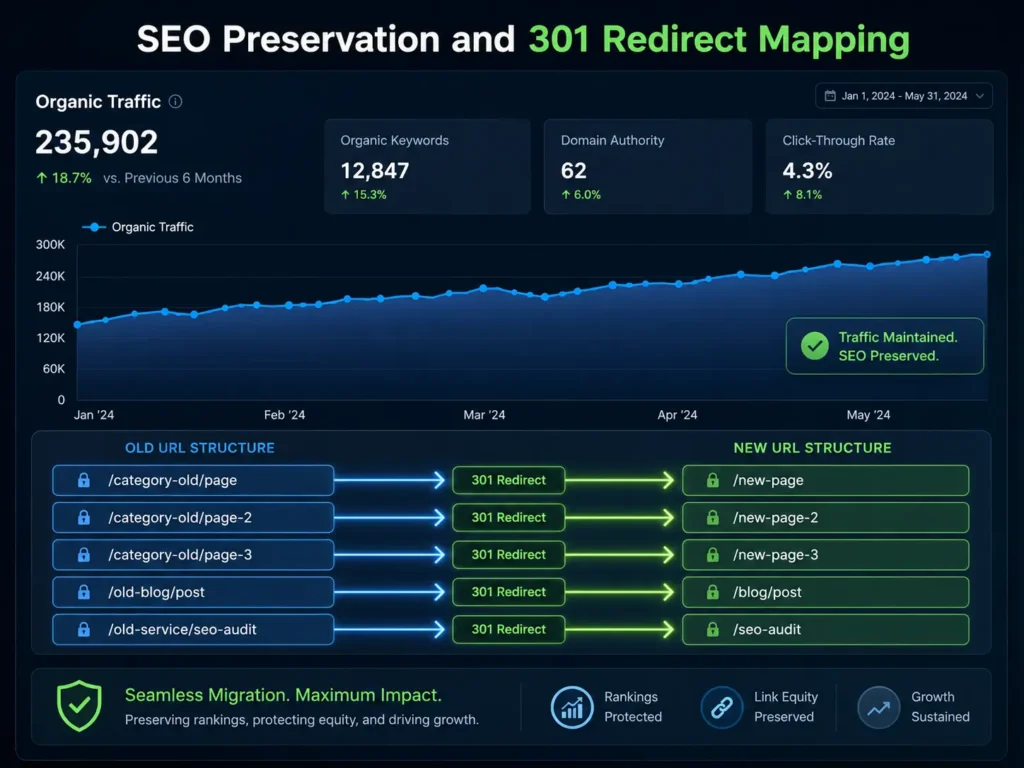
4. Phase 3 — SEO Preservation and 301 Redirect Architecture
SEO preservation is the component of website migration services that gets the most attention — and for good reason. It is also the component that is most frequently handled inadequately by teams that are focused on the technical migration and treat SEO as an afterthought.
We build a complete 1-to-1 redirect map before the DNS cutover. Every URL on the old site is mapped to its logical equivalent on the new site and implemented as a server-level 301 redirect. Not wildcard redirects that send everything to the homepage — specific, page-to-page redirects that preserve user intent and pass link equity correctly.
For large sites with complex URL structures, this mapping process involves custom scripting to handle URL pattern transformations systematically, combined with manual review for high-value pages where the redirect destination requires judgment rather than a pattern match.
Beyond redirects, we migrate all on-page SEO elements: meta titles, meta descriptions, canonical tags, image alt text, heading structure, and JSON-LD structured schema data. These do not transfer automatically between platforms — they need to be explicitly carried over and validated on the new architecture.
After the migration goes live, we immediately submit updated XML sitemaps to Google Search Console and monitor crawl behavior closely for the first 72 hours. Server logs, crawl error reports, and real-time indexing data tell us how Googlebot is interacting with the new site architecture and flag any issues before they compound.
According to Google’s official site migration documentation, proper 301 redirect implementation and post-migration monitoring are the two most critical factors in preserving search rankings through a domain or platform change — a finding that directly shapes how we execute every website migration service engagement.
5. Phase 4 — The Zero-Downtime DNS Cutover
The DNS cutover is the moment the live site transitions to the new environment. Handled correctly, it is imperceptible to users. Handled incorrectly, it produces hours of downtime and a period of inconsistent behavior as DNS changes propagate across global nameservers at different speeds.
We manage this process with a specific protocol developed through experience with our website migration services across many platform types and hosting configurations.
Several days before the planned cutover, we lower the TTL (Time to Live) value on the domain’s DNS records. TTL controls how long DNS resolvers cache the current record before checking for updates. Lowering it in advance means that when the actual change is made, it propagates globally much faster — reducing the window during which some users might be directed to the old server.
We schedule the cutover for the site’s lowest-traffic window — typically the early hours of a weekend morning in the primary user timezone. We freeze the old database to prevent new data from being written to it, execute a final delta-sync to capture any activity that occurred after the last staging sync, and update the DNS records to point to the new server.
We monitor actively during propagation — checking the site from multiple geographic locations, verifying database connectivity, confirming that all integrations are firing correctly, and watching server logs for unexpected errors. The old environment stays available and restorable for a defined period after the cutover as an additional safety net.
Your users experience a working website throughout. The migration happens around them, not at their expense.
6. Complex E-Commerce and Cross-Platform Migrations
Standard server-to-server migrations — moving the same CMS to better hosting — are straightforward. The real complexity in website migration services comes with cross-platform migrations, where the source and destination use fundamentally different data models.
Shopify or BigCommerce to custom infrastructure
Hosted e-commerce platforms store data in proprietary formats. Customer records, order histories, product data, and subscription tokens are structured according to the platform’s own schema. Moving this data to a custom WooCommerce or Laravel backend requires custom migration scripts that translate between the two data models, field by field.
Password hashing is a specific challenge. Shopify uses its own hashing algorithm, and those hashes cannot be directly imported into most other systems. We handle this by migrating the account data and implementing an automated password reset flow that triggers on first login after migration — preserving the customer relationship without exposing security gaps.
Legacy CMS to modern frameworks
Old Drupal, Joomla, and Magento 1 installations carry years of content and data that represent real business value. They also carry security vulnerabilities, outdated dependencies, and performance limitations that make them expensive to maintain.
Our website migration services for legacy CMS transitions involve a careful content extraction process, data model mapping to the new architecture, and a structured import process that preserves content relationships, taxonomy, user accounts, and media assets. The result is the same data on a platform that is actually maintainable and secure.
Monolithic to headless architecture
Moving from a traditional coupled CMS to a headless architecture — where the backend content management is separated from the frontend delivery layer — is a more complex migration than a platform switch. It requires restructuring how content is modeled in the CMS, building new API endpoints, and deploying a new frontend application alongside the content migration.
We handle the full scope of headless migrations, from content modeling in Sanity or Contentful to frontend build in Next.js or React, with the migration executed in phases to minimize risk and maintain continuity.
7. Post-Migration Monitoring and Stabilization
The go-live date is not the end of a website migration service engagement. It is the beginning of the stabilization phase.
The first 72 hours after a migration go live are critical. This is when unexpected issues surface — edge cases that did not appear in staging, crawl behavior that reveals redirect gaps, integrations that behave differently in the production environment than in testing. Active monitoring during this window allows issues to be caught and resolved before they affect a significant number of users or cause measurable SEO damage.
We monitor server logs, Google Search Console crawl data, real-time analytics for traffic and conversion rate anomalies, error logging from application monitoring tools, and integration health for payment processing and CRM sync.
After the initial 72-hour window, we continue monitoring at reduced intensity for two to four weeks — tracking how Google is recrawling and reindexing the new architecture and verifying that organic traffic is stabilizing as expected. Any significant deviations from expected patterns trigger an investigation.
The goal of our website migration services is not just a technically successful migration — it is a migration that leaves your site in a better position than it was before: faster, more secure, easier to manage, and with rankings intact or improving.
Frequently Asked Questions
Q: Will my website experience downtime during the migration?
No. We build and test everything in a private staging environment while your live site remains fully operational. The DNS cutover — the moment users are directed to the new server — is managed with TTL pre-lowering and scheduled during your lowest-traffic window. Users experience a working website throughout the entire process.
Q: Will I lose my Google rankings after migrating to a new platform?
Not when the migration is executed correctly. We implement comprehensive 1-to-1 301 redirects, preserve all on-page SEO elements, and monitor crawl behavior closely after launch. Minor temporary fluctuations are normal as Google processes a new site architecture, but our website migration services are specifically designed to retain domain authority and organic visibility.
Q: How do you handle user passwords during a cross-platform migration?
It depends on the source platform. Where password hashes can be exported and re-imported in a compatible format, we handle the transfer directly. Where the source platform uses a proprietary hashing algorithm that cannot be transferred — Shopify being the most common example — we implement an automated password reset flow that guides users to set a new password on their first login after migration.
Q: Can you migrate active payment subscriptions without interrupting billing?
Yes, for gateways like Stripe and Braintree where customer payment tokens are stored on the gateway’s servers rather than yours. We migrate the customer token references to the new platform so recurring billing continues without requiring customers to re-enter payment details.
Q: How long do website migration services typically take?
A server-to-server migration for a straightforward site takes 48 to 72 hours of execution time, though planning and testing extend the total engagement. A complex cross-platform migration for a large e-commerce store — 10,000+ products, full order history, user accounts — typically takes 3 to 5 weeks from audit to go-live.
Q: What types of migrations do you handle?
We handle server migrations, CMS platform migrations, e-commerce platform migrations, domain migrations, monolithic to headless architecture transitions, and legacy system modernizations. If it involves moving a website from one environment to another without losing data or rankings, it falls within our website migration services scope.
Your Digital Infrastructure Is Too Important to Risk
Years of SEO equity, customer data, transaction history, and operational continuity are built into your current site. A migration handled carelessly puts all of it at risk. A migration handled properly leaves it intact — and usually improves on it.
Our website migration services exist for businesses that understand the stakes and want the process managed by engineers who have done this before, have a documented protocol for every phase, and take accountability for the outcome.
MarkupMarvel delivers website migration services for businesses that cannot afford to get it wrong.
Explore
Other Services We Provide

GEO and AEO Services: 7 Proven Ways to Win AI Search
The shift is not subtle. Users who previously typed a search query, scrolled through ten...
Service Details →
5 Proven Rapid MVP Development Services for Startups
In the modern software industry, the graveyard of failed startups is filled with brilliant founders...
Service Details →
No-Code AI Workflow Automation: Proven B2B Services
Let’s look at a very common, highly destructive paradox in the modern B2B landscape. Over...
Service Details →