
7 Reasons to Choose Custom WordPress Development
WordPress runs more than 40% of the entire internet. That single statistic gets repeated everywhere — in agency decks, in sales pitches, in blog posts like this one. But here's what that number rarely tells you: the vast majority of those WordPress sites are held together with a commercial theme, 30 to 40 plugins, and a backend experience so cluttered that nobody on the marketing team actually wants to log in.
[toc]
7 Reasons Smart Businesses Invest in Custom WordPress Development Services
WordPress runs more than 40% of the entire internet. That single statistic gets repeated everywhere — in agency decks, in sales pitches, in blog posts like this one. But here’s what that number rarely tells you: the vast majority of those WordPress sites are held together with a commercial theme, 30 to 40 plugins, and a backend experience so cluttered that nobody on the marketing team actually wants to log in.
For a personal blog or a small local business, that setup is fine. For a scaling B2B company, a high-traffic e-commerce brand, or a SaaS platform with real performance expectations, it becomes a slow-burning liability.
At MarkupMarvel, we have rebuilt dozens of template-based WordPress sites for businesses that had hit that wall. The pattern is almost always the same: slow load times, a plugin that broke during a core update, a marketing team waiting on a developer just to change a heading, and a website that stopped feeling like an asset a long time ago.
Custom WordPress development services exist to fix all of that — not by adding more tools on top of the problem, but by engineering the right structure from the beginning. Below, we walk through exactly why it matters, how we build, and what you can expect when you do this properly.
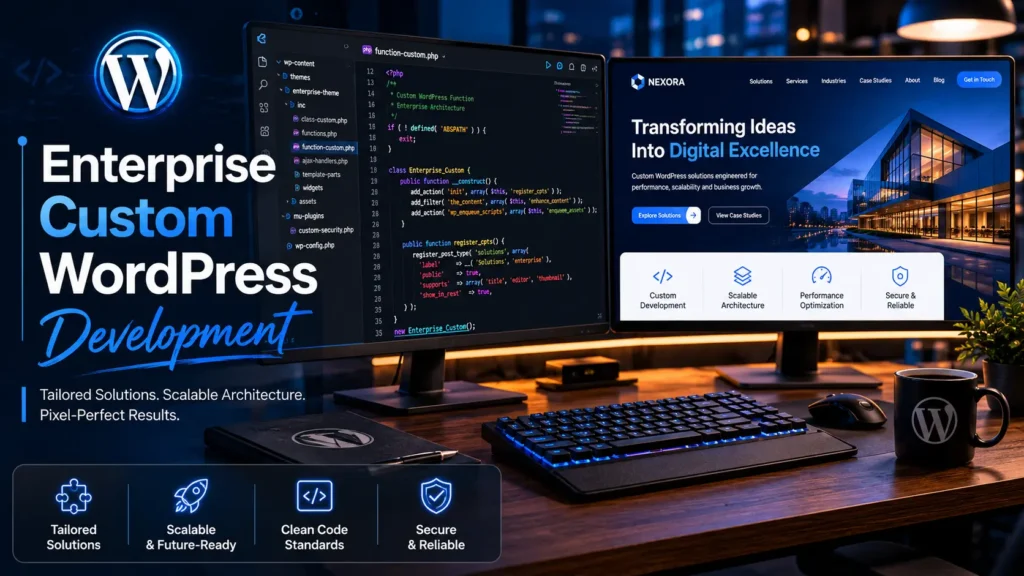
1. The Real Cost of a Commercial WordPress Theme
Most digital agencies default to commercial themes — Divi, Avada, or a multipurpose Envato template — because it lowers their upfront build cost. Paired with a page builder like Elementor or WPBakery, they can ship a site in two weeks. The client sees a live URL, signs off, and the agency moves on.
What the client inherits is a different story.
Performance that degrades over time
Commercial themes are designed to work for every type of business across every industry. To pull that off, they load enormous CSS and JavaScript libraries on every single page of your site — whether those features are being used or not. If your website uses 15% of what a commercial theme offers, the other 85% is still being loaded in the background. Google’s Core Web Vitals measure this. Your rankings reflect it. Your mobile users feel it.
According to Google’s Web Almanac, sites with poor Core Web Vitals scores see measurably lower conversion rates and higher bounce rates — directly affecting revenue. This is not a theoretical SEO concern. It is a business problem.
The plugin dependency trap
When a theme cannot handle a specific feature, the developer installs a plugin. Then another. Then another. By the time a commercial WordPress build is fully configured, it is common to see 25 to 40 active plugins running simultaneously. Every single one of those plugins is maintained by a different developer, updated on a different schedule, and tested against a different subset of the WordPress ecosystem.
When WordPress releases a core update — which it does regularly — these plugins conflict. The result is broken layouts, features that stop working, or the White Screen of Death that takes your site entirely offline. These incidents rarely happen at a convenient time.
A backend your team avoids
Commercial theme backends fill up fast. Duplicate menu items, broken theme options panels, and overlapping layout controls from competing plugins create a backend that nobody wants to navigate. Publishing a new landing page or updating a case study becomes a task that requires calling a developer. At that point, the website has stopped being a marketing asset and started being a bottleneck.
Custom WordPress development services eliminate all of this by building only what you need, structured the way your business actually works.
2. What Pixel-Perfect Figma to WordPress Conversion Actually Means
A lot of agencies claim they do Figma to WordPress conversion. What most of them actually do is load a commercial theme, find the closest pre-built layout, and adjust the colors and fonts until it looks approximately right. That is not conversion. That is approximation.
Our process is different. We start with a stripped-down base theme — typically Underscores (_s), an industry-standard blank slate developed by the core WordPress team — and we write every element from scratch.
Your approved Figma file is treated as a specification, not a reference. Every spacing value, every font weight, every hover state, every responsive breakpoint is coded to match. Not close enough. Exactly.
The result is a frontend that carries zero dead weight. There are no unused CSS classes sitting in the stylesheet from a component you did not use. There are no JavaScript libraries loaded for a slider that does not appear on your site. Every kilobyte in the codebase is there for a reason, and that architectural discipline translates directly into faster load times and cleaner performance scores.
This approach also means your design integrity is preserved across every device. Ultrawide monitors, standard desktops, tablets, and mobile screens all render your site exactly as the design specifies — not as a page builder interprets it.
3. Advanced Custom Fields: Turning WordPress Into a Real Content System
The default WordPress editing experience was built for blog posts. If your business is managing a complex service directory, a gated resource library, a structured team roster, or any kind of relational data, the default setup works against you.
Advanced Custom Fields (ACF) is the bridge between what WordPress can do by default and what an enterprise content system actually needs. We use it heavily in every custom WordPress development project we take on.
Here is what that looks like in practice: instead of a single content editor where your team pastes text and hopes the formatting holds, we build structured field groups that match your exact content model. A service page might have separate fields for the headline, the subheadline, a feature list, a testimonial block, a CTA label, and a CTA destination. Each field has a label, a description, and validation logic.
Your marketing team fills in a clean, labeled form. The frontend renders it exactly as designed. No HTML knowledge required. No formatting guesswork. No developer needed for routine content updates.
This is not just a workflow improvement — it is a structural shift in how your organization manages its digital presence. When content is stored in a structured, queryable format rather than pasted into a text block, it becomes possible to surface it dynamically, filter it, and repurpose it across different parts of the site without rebuilding anything.
4. Native Gutenberg Block Development: No More Page Builder Dependency
Third-party page builders have dominated WordPress development for the better part of a decade, and they have caused an enormous amount of damage along the way. Elementor, WPBakery, and similar tools insert proprietary shortcodes into your content database. If you ever need to switch builders — or if the builder plugin is deprecated — your content is locked in a format only that plugin understands.
Beyond the lock-in problem, page builders are heavy. They load their own JavaScript frameworks, their own CSS libraries, their own widget logic. All of it runs on every page, regardless of whether that page actually uses those elements.
We take a different approach. We build custom Gutenberg blocks natively — written in React, integrated directly into the WordPress block editor, and designed specifically around your brand’s content types and layout patterns.
What your team gets is a proprietary block library. A hero block that always renders your approved headline layout. A testimonial block that pulls from your structured ACF data. A resource grid block that filters by category. A CTA block with your brand’s exact button styles baked in.
These blocks cannot go off-brand because they were built to your brand specification. They load quickly because they carry no external dependencies. And because they live inside the native WordPress editor, your team never needs a third-party plugin to manage content.
5. Headless WordPress for Enterprise-Level Performance
For most businesses, a well-built custom WordPress site — lightweight code, proper caching, optimized images, clean architecture — delivers the performance they need. For global enterprises, high-volume publishers, and SaaS platforms that serve millions of sessions, there is a ceiling to what a traditional WordPress setup can achieve.
That ceiling is where headless WordPress architecture begins.
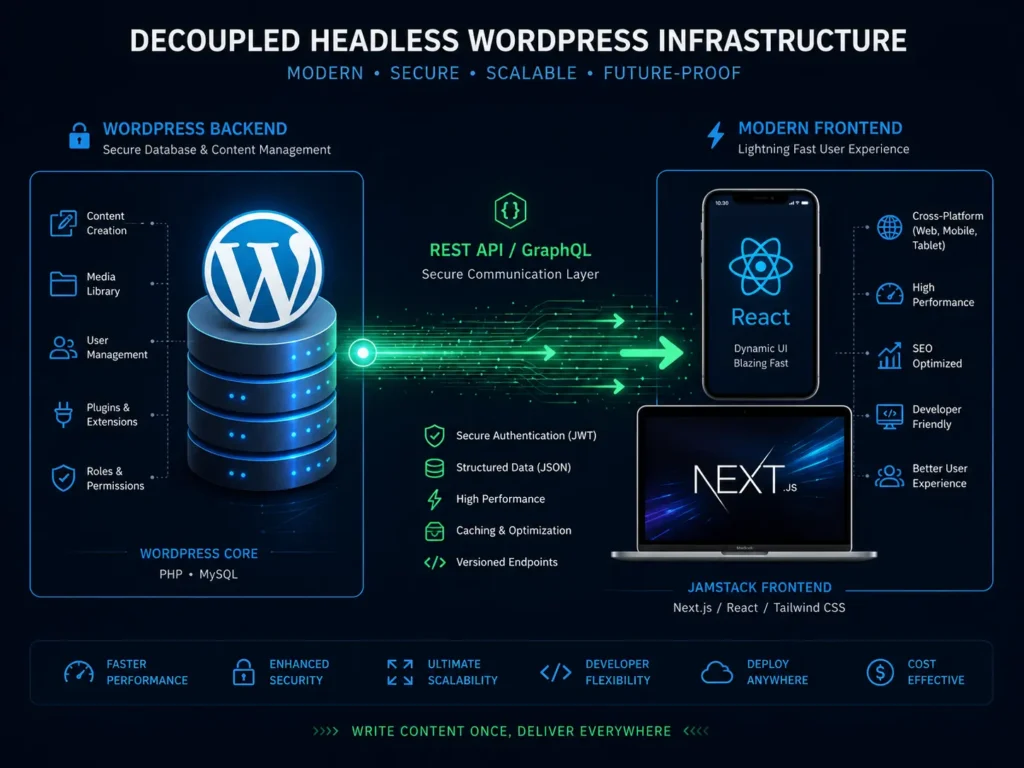
In a standard WordPress installation, the frontend and backend live on the same server and are tightly coupled. When a user requests a page, WordPress queries the database, assembles the template, and delivers HTML. Under high load, this process creates bottlenecks.
A headless setup separates them entirely. WordPress becomes a pure content repository — a headless CMS that stores and serves data. A completely separate frontend application, built in Next.js or React, handles what users actually see. The two communicate through the WordPress REST API or GraphQL.
The advantages are significant:
Speed: The frontend can be statically generated or server-rendered with edge caching, delivering near-instantaneous load times regardless of server load.
Security: The WordPress database is not publicly exposed. The most common WordPress attack vectors — malicious login attempts, XML-RPC exploits, database injection through the frontend — do not apply to a properly configured headless deployment.
Omnichannel delivery: The same WordPress content can be pushed to a website, a mobile application, a digital kiosk, and a voice interface without duplicating the content management workflow.
Your content team keeps working in the WordPress dashboard they already know. Your users get an experience that loads like a native application.
6. Core Web Vitals Optimization and Enterprise Security Hardening
Building a custom WordPress site is not just about what the code does — it is about what the code does not do. Every unnecessary library, every unoptimized image, every redundant database call is a tax on your site’s performance.
Our custom WordPress development services are built around eliminating that tax from the start.
Performance built into the architecture
We defer non-critical JavaScript so it does not block page rendering. We generate WebP versions of every image and serve them with proper lazy loading. We minify CSS and scope it to the components that actually use it. We implement object caching at the database layer and full-page caching at the server layer.
The result: our custom builds consistently score above 90 on Google PageSpeed Insights for both mobile and desktop — not because we ran a speed optimization plugin at the end, but because performance was designed into the structure from the beginning.
Security that does not rely on luck
Default WordPress installations are predictable. The login URL is /wp-admin. The database prefix is wp_. The user enumeration endpoint is publicly accessible. Attackers know all of this because it is the same for every standard installation.
We change the defaults. Login URLs are customized. Database inputs are sanitized against SQL injection. XML-RPC is locked down. User enumeration is blocked. Applications are deployed on managed cloud infrastructure with environment separation between staging and production.
Your data does not rely on a security plugin to stay protected — the architecture itself is hardened.
7. Custom WooCommerce Development for High-Volume Commerce
Off-the-shelf WooCommerce setups — a default theme, a few extension plugins, and a standard checkout flow — work well enough for small stores. For brands running thousands of SKUs, complex pricing logic, subscription models, or B2B order workflows, the default WooCommerce configuration runs out of road quickly.
Custom WooCommerce development means engineering the commerce layer around your actual business rules. Custom product data structures built with ACF. Pricing logic that reflects your actual wholesale tiers, discount rules, or subscription intervals. Checkout flows designed for your specific customer journey, not for the average of all possible customers.
The performance principles are the same: custom code, no unnecessary plugins, architecture built for scale rather than patched for it.
Frequently Asked Questions
Q: Why invest in custom WordPress development services instead of a premium commercial theme?
Premium themes are built to serve thousands of businesses simultaneously. To do that, they include features, layouts, and code for use cases that have nothing to do with your business. That code still loads on every page. Custom development builds exactly what your business needs — nothing more, nothing less. The result is a faster site, a cleaner backend, and a team that can actually manage content without calling a developer.
Q: Can you convert our Figma designs into a fully functioning WordPress site?
Yes — this is a core part of what we do. We write custom HTML5, CSS3, and JavaScript to match your approved Figma files exactly. We do not use page builders to approximate your design. Every breakpoint, every spacing value, every interactive state is coded to match the specification.
Q: What is the real difference between standard WordPress and headless WordPress?
Standard WordPress handles both content management and frontend rendering on the same server. Headless WordPress separates them — WordPress manages content in the background, and a separate frontend application built in Next.js or React handles what users see. This improves load times, strengthens security, and allows the same content to be delivered to multiple surfaces simultaneously.
Q: How do you handle WordPress core updates on a custom build?
Because our builds do not depend on dozens of third-party plugins, core updates are stable and predictable. We manage updates in a staging environment, verify nothing breaks, and then push to production. Your site does not go offline during maintenance cycles.
Q: Will our marketing team be able to update the site without developer help?
Yes — completely. Custom theme does not mean locked theme. We build backend interfaces using Advanced Custom Fields and custom Gutenberg blocks that are designed specifically for how your team publishes. Text, images, new landing pages, blog posts — all fully manageable without touching code.
Q: Do you offer ongoing maintenance after the build is complete?
Yes. We act as a long-term technical partner, providing managed maintenance, proactive security patching, performance monitoring, and priority support. Custom WordPress development services are not a one-time handoff — they are the beginning of an ongoing relationship.
Stop Letting Your Website Hold Your Business Back
Your digital infrastructure should work as hard as your team does. A site built on a commercial theme and a stack of fragile plugins is not built for growth — it is built for launch day, and it starts working against you shortly after.
Custom WordPress development services give you a foundation that performs under real conditions, that your team can manage independently, and that scales with your business instead of constraining it.
MarkupMarvel builds WordPress platforms engineered for businesses that are serious about growth.
Explore
Other Services We Provide

Custom AI Integration Services: 7 Proven Ways That Work
In the modern business landscape, Artificial Intelligence is no longer an experimental luxury or a...
Service Details →
7 Proven Custom Shopify Development Services That Convert
There is a moment every growing e-commerce brand hits. The store is live, sales are...
Service Details →
Multi-Vendor Marketplace Development: 7 Proven Strategies
The traditional, single-seller e-commerce model is rapidly evolving. If you look at the most lucrative,...
Service Details →