
Custom Booking Reservation Systems: 7 Powerful Features
A double booking that results in two customers showing up for the same slot. A no-show that left a staff member idle for an hour with no way to fill the time. A customer who abandoned the online booking flow because it required too many steps. A manual reconciliation process at the end of every week because the booking software does not sync with the accounting system.
[toc]
Custom Booking Reservation Systems: 7 Powerful Features
Most businesses do not realize their booking system is costing them money until the problems become impossible to ignore.
A double booking that results in two customers showing up for the same slot. A no-show that left a staff member idle for an hour with no way to fill the time. A customer who abandoned the online booking flow because it required too many steps. A manual reconciliation process at the end of every week because the booking software does not sync with the accounting system.
These are not unusual problems. They are the predictable outcomes of using generic scheduling tools for operations that have outgrown them.
Tools like Calendly, Mindbody, and Acuity are well-designed for simple use cases — one person, one service type, one calendar. When the requirements get more complex — multiple staff members with individual availability rules, multiple locations, resource allocation alongside time slots, deposit collection, dynamic pricing — generic tools hit their ceiling. The workarounds start accumulating, and the system that was supposed to save time starts consuming it.
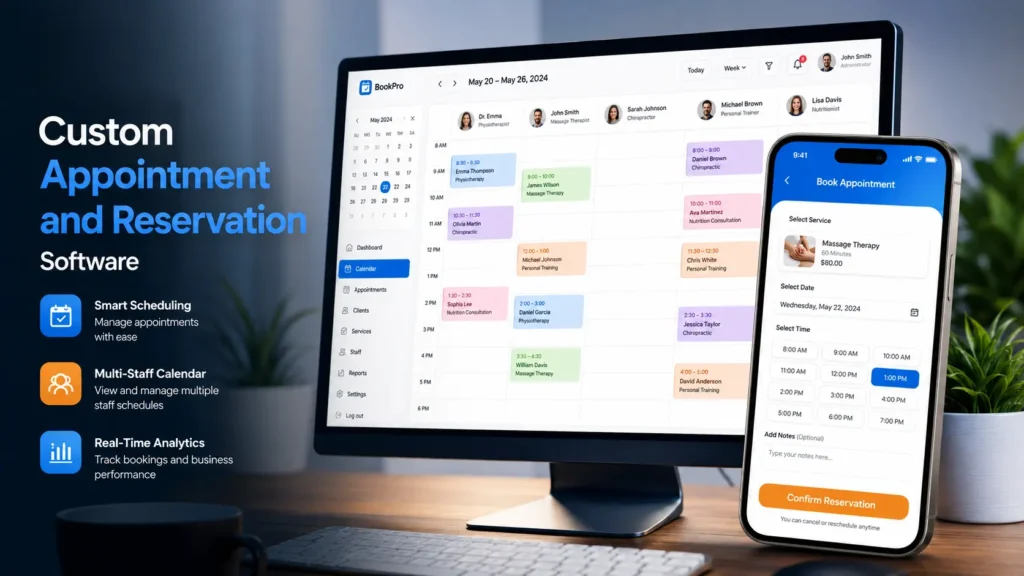
Custom booking reservation systems are built for the complexity that generic tools cannot handle. At MarkupMarvel, we engineer booking platforms that map to your actual operational rules — the buffer times, the resource locks, the deposit requirements, the staff-specific logic — and automate the workflows that your team is currently handling manually.
1. Why Generic Booking Tools Break Down at Scale
Generic booking software is designed to work for the widest possible range of businesses. That design philosophy is what makes it easy to set up — and what makes it limiting as soon as your operations have specific requirements.
The limitations usually appear gradually. The tool works fine at first. Then a specific business rule requires a workaround. Then another. Staff start manually blocking time slots to prevent conflicts the system should catch automatically. Admins double-check bookings before confirming them because they cannot fully trust the availability logic. Customers call to verify details that the system should have communicated automatically.
By this point, the booking tool is not reducing administrative work — it is generating it.
The edge case problem
A single service that requires both a specific staff member and a specific room to be available simultaneously is not a rare requirement. It is standard for clinics, photography studios, equipment rental companies, and dozens of other service businesses. Generic booking tools typically cannot enforce this kind of multi-resource availability check. The result is bookings that look confirmed in the system but create conflicts in reality.
The data ownership problem
When your customer records, booking history, and payment data live inside a third-party SaaS platform, you do not own that data in any practical sense. You cannot export it cleanly, you cannot build on top of it, and you are dependent on the platform’s pricing, policy changes, and continued existence. Custom booking reservation systems give you ownership of your own operational data.
The integration problem
Generic tools offer preset integrations with popular platforms. When your business uses something outside that preset list — a specific ERP, an industry-specific CRM, a custom property management system — you hit a wall. Custom booking reservation systems are built with your integration requirements as first-class requirements, not afterthoughts.
According to Stripe’s payment integration documentation, embedding payment collection directly into the booking flow — rather than redirecting users to a separate checkout — significantly reduces abandonment rates and improves conversion. This kind of tight integration requires custom development.
2. Booking Logic Engineered for Real Operations
The difference between a generic booking tool and a custom booking reservation system shows up most clearly in the handling of business rules.
Every business has rules that govern how bookings work. Some are simple — a 30-minute appointment slot, an open calendar, a confirmation email. Others are more complex, and they are often the rules that matter most for operational efficiency and revenue protection.
Buffer times and preparation windows
A service that requires 15 minutes of cleanup after each appointment cannot be back-to-back booked without that buffer built into the system. A mobile service that requires travel time between locations needs that travel time factored into availability. Generic tools offer basic buffer settings; custom booking reservation systems implement the exact logic your services require, tied to specific service types rather than applied globally.
Multi-resource allocation
A booking that reserves a staff member but not the room they need — or the equipment they use — is an incomplete booking. Custom booking reservation systems lock all required resources simultaneously when a reservation is confirmed. If any one of the required resources is unavailable, the slot is unavailable. This prevents the category of conflict that generic tools cannot catch.
Capacity management and waitlists
Group classes, shared spaces, and multi-participant events require capacity enforcement with waitlist logic. When a class fills, the system closes bookings and opens a waitlist. When a cancellation occurs, the system automatically notifies the next person on the waitlist and holds the slot for a defined response window. This happens without staff involvement.
Recurring appointments and subscription bookings
For businesses with regular customers — ongoing therapy clients, weekly fitness sessions, monthly maintenance visits — recurring booking logic eliminates the need for manual re-scheduling. The system creates the series, manages the calendar, and handles payment collection on the defined schedule.
3. Frontend Design Built for Conversion
A booking flow that is confusing or requires too many steps loses customers before they complete the reservation. This is especially true on mobile, where a significant proportion of booking decisions happen — and where a poorly designed interface is immediately abandoned.
We design the customer-facing booking experience around one goal: getting the customer from initial intent to confirmed reservation in the fewest possible steps, with complete clarity at every stage.
Service selection
The first screen presents services clearly — descriptions, durations, pricing, and any relevant options. If your business has multiple service categories or locations, the interface filters options cleanly without overwhelming the user with choices.
Availability display
Available slots are shown in real time, updated as bookings come in. The interface handles timezone differences for multi-location or remote businesses without requiring the customer to do any mental conversion. Unavailable slots are clearly indicated without creating dead ends in the flow.
Checkout and payment
Payment is collected within the booking flow — not after a redirect to a separate page. Deposit requirements, full payment options, and cancellation policy terms are presented clearly before the customer commits. The checkout is PCI-compliant and works correctly on every device and browser.
Confirmation and reminders
Immediate confirmation with full booking details. Automated reminder sequences — email and SMS — sent at configurable intervals before the appointment. Reminder timing and content are configurable per service type, so a medical appointment reminder looks and reads differently from a restaurant reservation reminder.
4. Real-Time Sync and Deep API Integrations
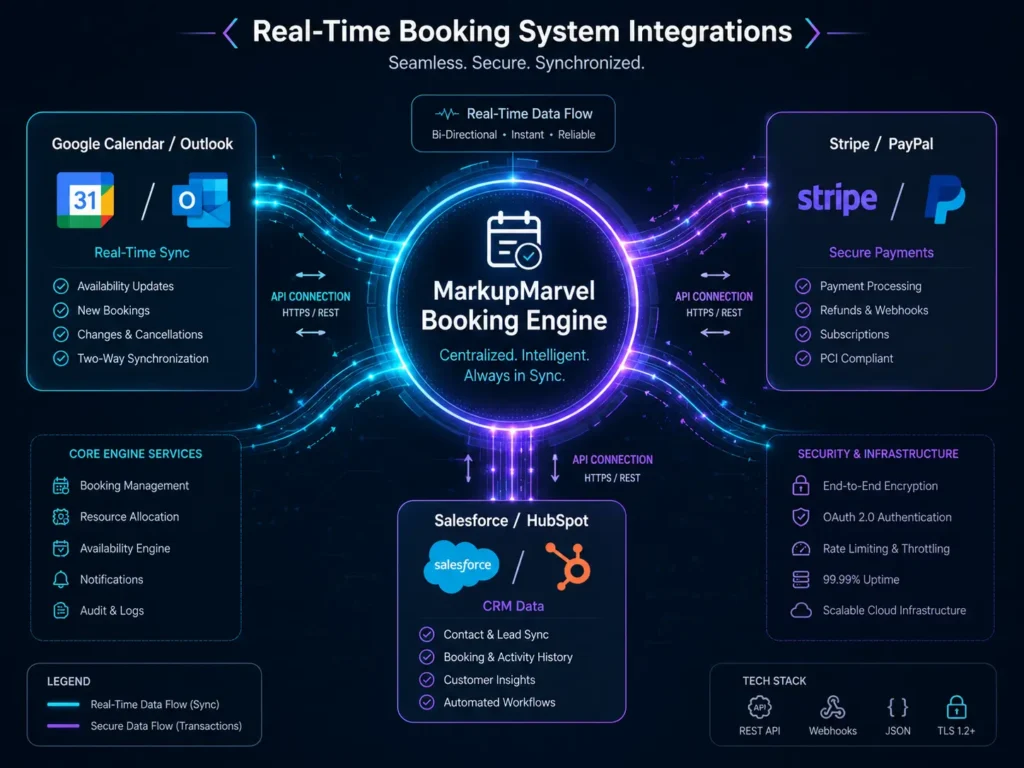
A custom booking reservation system that operates in isolation from the rest of your business tools creates data fragmentation. Bookings need to appear in staff calendars. Payments need to flow into accounting. New customers need to appear in the CRM. These connections need to happen automatically, in real time, without manual data entry bridging the gaps.
We build these integrations as core features of the booking architecture — not as add-ons configured through third-party connectors.
Calendar sync
Confirmed bookings push to staff Google Calendar or Outlook calendars immediately. Cancellations and reschedules update automatically. Staff see their actual schedule in the calendar application they already use, without logging into the booking system separately.
Payment and accounting
Stripe processes payments and deposits within the booking flow. Transaction data syncs to QuickBooks or Xero automatically — categorized, reconciled, and ready for accounting review without manual export/import cycles.
CRM integration
New customer bookings create or update records in HubSpot, Salesforce, or ActiveCampaign. Booking history, service preferences, and payment records attach to the customer profile. Marketing automations can trigger based on booking behavior — a follow-up sequence after a first appointment, a re-engagement campaign after a period of inactivity.
SMS and notification services
Automated SMS confirmations and reminders through Twilio or similar services. Custom notification logic — different messages for different service types, different reminder timing for different appointment durations, different cancellation policy reminders based on booking value.
5. Secure Payments, Deposits, and Dynamic Pricing
Unpaid reservations are a revenue problem. A customer who books without paying can cancel without consequence — and in service businesses, that last-minute cancellation leaves a gap that cannot be filled.
Custom booking reservation systems enforce financial rules at the point of booking, before the reservation is confirmed.
Deposit and full payment collection
The system can require full payment upfront, a non-refundable deposit, or a card authorization that is charged only if a cancellation policy is triggered. The rule can be set globally, per service type, or per customer tier. A first-time customer might be required to pay a deposit; a returning VIP customer with a track record might book without one.
Cancellation fee enforcement
When a booking is cancelled within the policy window, the system charges the stored payment method automatically — without requiring staff to initiate the charge manually. The policy terms were presented and agreed to at checkout, and the enforcement is handled by the system.
Dynamic pricing
Pricing does not have to be static. Custom booking reservation systems support demand-based pricing — automatically increasing rates during peak hours, weekend slots, or high-demand periods. Remaining availability can also influence pricing, with discounts applied to underbooked time slots to fill capacity. These rules are configured in the admin dashboard and apply without any manual adjustment.
6. Admin Dashboard and Multi-Location Management
The administrative experience of a custom booking reservation system is as important as the customer-facing experience. If your team spends significant time managing the system rather than serving customers, the efficiency gains of automation are being offset.
We build admin dashboards that give your team clear visibility and direct control without unnecessary complexity.
Daily operational view
The primary admin view shows today’s schedule across all staff members and locations, with the ability to drill into individual appointments, process manual bookings for phone or walk-in customers, issue refunds or apply credits, and adjust availability in real time.
Revenue and performance reporting
Booking volume, revenue by service type, cancellation rates, no-show rates, staff utilization — all available in the admin dashboard without requiring CSV exports or manual calculation. Reporting can be filtered by date range, location, staff member, or service category.
Multi-location and role-based access
For businesses operating across multiple locations, custom booking reservation systems enforce strict role-based access control. A location manager sees and manages only their location’s schedule. A regional manager has visibility across a defined set of locations. Headquarters has global access and reporting. Each level of access is configured in the admin dashboard and enforced at the API level.
Staff self-management
Staff members can manage their own availability, request time off, and view their upcoming schedule through a dedicated staff portal — reducing the administrative load on managers while keeping the master schedule accurate.
7. Industry-Specific Applications
Custom booking reservation systems serve meaningfully different purposes across different industries, and the architecture reflects those differences.
Healthcare and wellness
Patient scheduling with provider-specific availability, treatment room allocation, and HIPAA-compliant data handling. Automated intake forms collected before the appointment. Insurance verification integrations where applicable. Recall scheduling for follow-up appointments.
Hospitality and property rental
Room or property availability across multiple units, check-in and check-out time management, cleaning crew scheduling triggered automatically by checkout, dynamic pricing based on occupancy and seasonal demand, and channel management for properties listed on multiple booking platforms.
Equipment and vehicle rental
Asset availability tracking across a physical inventory, damage deposit collection at booking, maintenance blackout scheduling, and utilization reporting to inform fleet management decisions.
Education and coaching
Individual and group session scheduling, package and subscription management for ongoing clients, waitlist management for popular instructors or time slots, and attendance tracking.
The business logic differs across these verticals, and that is exactly why custom booking reservation systems outperform generic tools — the logic is built for the specific context, not approximated from a general template.
Frequently Asked Questions
Q: What makes custom booking reservation systems different from tools like Calendly or Mindbody?
Generic tools are built for the average use case across a wide range of businesses. Custom booking reservation systems are built for your specific operational rules — your buffer times, your resource allocation requirements, your payment policies, your integration needs. When your requirements are more complex than the generic tool supports, custom development is the right approach.
Q: Can a custom booking system integrate with our existing website?
Yes. We deploy the booking engine as a headless integration into your current website — WordPress, Next.js, Shopify, or any other platform — or as a standalone application on a subdomain. The booking experience is fully branded to your domain regardless of the integration approach.
Q: How does the system prevent double bookings?
Server-side validation and database locking. When a user selects a time slot, the system temporarily locks that combination of time, staff, and resources in the database while they complete checkout. No other booking can claim the same resources during that window. The lock releases if checkout is abandoned.
Q: Can you migrate our historical data from our current booking software?
Yes. We handle data migration from legacy platforms — customer records, booking history, staff profiles, and future appointments — into the new system with full data integrity verification before go-live.
Q: How long does a custom booking reservation system take to build?
A focused booking system for a single service type and location typically takes 6 to 10 weeks. A multi-location platform with complex resource allocation, dynamic pricing, and multiple third-party integrations runs 12 to 18 weeks. We provide a specific timeline during the scoping phase.
Q: Do you provide ongoing support after launch?
Yes. We provide managed maintenance, performance monitoring, and priority support. Booking systems are operational infrastructure — downtime or bugs have direct revenue impact, and we treat support accordingly.
Your Booking System Should Work for You
A booking system that requires manual intervention to prevent conflicts, cannot enforce your payment policies automatically, or does not sync with the rest of your business tools is not solving the problem it was supposed to solve.
Custom booking reservation systems are built around your actual operational requirements — not around what a generic template can approximate. The result is a system your team trusts, your customers find easy to use, and your business runs on without constant maintenance overhead.
MarkupMarvel builds custom booking reservation systems for businesses that need more than a scheduling widget.
Explore
Other Services We Provide

Proven Managed Web Hosting Services We Offer: 7 Solutions
You just invested tens of thousands of dollars engineering a custom, high-performance web application. Do...
Service Details →
GEO and AEO Services: 7 Proven Ways to Win AI Search
The shift is not subtle. Users who previously typed a search query, scrolled through ten...
Service Details →
Custom Blockchain Development Services: Secure Web3 Now
For the better part of a decade, the business conversation surrounding blockchain technology has been...
Service Details →